My Last Spotify Demo (this time I mean it - honest)

Earlier this month, I blogged about building my own Spotify Unwrapped. I did this by requesting a data export from Spotify and playing around with the data in Python and Astro. I built a simple, and probably bad, Astro site to view my stats. When I built it, I had an idea for a slight tweak to make it a bit better, but one that would require API usage. I stand by what I said about not wanting to use the API anymore (feel free to ask why in the comments), but I couldn't resist tinkering one more time. Here's what I did.
Using Python to Enhance Artist Info
In the output from Spotify's export, you get a detailed listing of the tracks you've listened to. As a reminder, here's an example:
  {
    "ts": "2025-09-18T13:43:56Z",
    "platform": "windows",
    "ms_played": 270186,
    "conn_country": "US",
    "ip_addr": "70.189.36.61",
    "master_metadata_track_name": "Halo",
    "master_metadata_album_artist_name": "Depeche Mode",
    "master_metadata_album_album_name": "Violator (Deluxe)",
    "spotify_track_uri": "spotify:track:6Rr6wXmEx6w6dsBuqqKJa3",
    "episode_name": null,
    "episode_show_name": null,
    "spotify_episode_uri": null,
    "audiobook_title": null,
    "audiobook_uri": null,
    "audiobook_chapter_uri": null,
    "audiobook_chapter_title": null,
    "reason_start": "trackdone",
    "reason_end": "trackdone",
    "shuffle": true,
    "skipped": false,
    "offline": false,
    "offline_timestamp": 1758202112,
    "incognito_mode": false
  },
While this gives a good amount of information, there isn't much about the artist outside of their name. One thing in particular I was interested in was the genres of the tracks I listened to. Genres are associated with artists, so I thought, I could use my exported data to get a list of artist names and then transform this into detailed artist info so I could get the genres. This involved a few steps:
- For each track in my history, I have an artist name. I can turn this into a unique list of artists.
- To get artist data, I need the ID, not the name of the artist. Spotify has a search API, but I wanted to use the batch APIs to get multiple artists at once to reduce the total number of API calls. The only way to get the artist ID is to get the track. So when I make my unique list of artists, I associate one track with them.
- Given I now have a list of unique artists with one track associated to it, I can use the batch API call, Get Several Tracks, which will give me artist ID values.
- Now I can use Get Several Artists to get full artist records.
All of this is done in a Python file that stores results to a JSON file for caching. I decided to do 50 results at a time, and run it manually, as I figured it wouldn't take terribly long. My total number of unique artists was under 10000 and I thought, I'll just run it a few times by hand and eventually I'll cover all the artists from my export. Obviously that's a hack, but it's my hack so it's beautiful.
With that in mind, here's the script:
import json
import glob
import os
import requests
import sys

"""
My goal is to get a unique list of artists from our data, and for each, get the enhanced
set of info from Spotify using their API. I will cache this info in artsts.json so I don't
have to keep hitting the API for the same artist.

Our data has a track id and an artist label, but not their id. So for each record we need
to look up, we need to get the proper artists ids. Spotify's batch APIs let you get 50 each,
so we'll get 50 tracks, and then 50 artists
"""

CLIENT_ID = os.environ.get('CLIENT_ID', '')
CLIENT_ID_SECRET = os.environ.get('CLIENT_SECRET', '')

def get_spotify_access_token(client_id: str, client_secret: str) -> str:
    payload = {
        'grant_type': 'client_credentials',
        'client_id': client_id,
        'client_secret': os.environ.get('CLIENT_SECRET', '')
    }

    req = requests.post('https://accounts.spotify.com/api/token', data=payload,
        headers = {
            'Content-Type': 'application/x-www-form-urlencoded'
        }
    )

    return req.json().get('access_token')

def get_tracks_info(tracks_ids: list, access_token: str) -> list:
    authorization = f'Bearer {access_token}'
    headers = {"Authorization": authorization}
    params = {
        "ids":','.join(tracks_ids)
    }
    r = requests.get('https://api.spotify.com/v1/tracks', params=params, headers=headers)
    return r.json()["tracks"]


def get_artists_info(artist_ids: list, access_token: str) -> list:
    authorization = f'Bearer {access_token}'
    headers = {"Authorization": authorization}

    params = {
        "ids":','.join(artist_ids)
    }

    r = requests.get('https://api.spotify.com/v1/artists', params=params, headers=headers)
    return r.json()["artists"]


access_token = get_spotify_access_token(CLIENT_ID, CLIENT_ID_SECRET)

with open('artists.json', 'r') as f:
    artist_cache = json.loads(f.read())

print(f"Loaded {len(artist_cache)} cached artists.")

files = glob.glob('data/*.json')

data = []

for file in files:
    with open(file, 'r') as f:
        content = json.loads(f.read())
        data += content
        #print(f"Loaded {file} with {len(content)} records.")

print(f"Total records loaded: {len(data)}")

unique_artists = {}
for record in data:
    artist = record['master_metadata_album_artist_name']
    unique_artists[artist] = record

print(f"There are {len(unique_artists)} unique artists.")

# Loop over unique artists and make a list of 50 that are not cached
artists_to_fetch = []
for artist in unique_artists:
    existing_artist = next((a for a in artist_cache if a.get('name', '') == artist), None)
    if existing_artist:
        #print(f"Skipping cached artist: {artist}")
        continue

    artists_to_fetch.append(unique_artists[artist])
    if len(artists_to_fetch) >= 50:
        break

print(f"There are {len(artists_to_fetch)} artists to fetch.")

# Get their track ids. It's possible we have dupe tracks, but that's okay - i think
track_ids = []
artist_ids = set()

for artist_record in artists_to_fetch:
    track_uri = artist_record.get('spotify_track_uri', '')
    if track_uri:
        track_id = track_uri.replace('spotify:track:', '')
        track_ids.append(track_id)

enhanced_tracks = get_tracks_info(track_ids, access_token)
print(f"Fetched {len(enhanced_tracks)} tracks from Spotify.")
for track in enhanced_tracks:
    for artist in track.get('artists', []):
        artist_id = artist.get('id', '')
        if artist_id:
            artist_ids.add(artist_id)

# list of artists from tracks can be more than 50
artist_ids = list(artist_ids)[0:50]
print(f"Found {len(artist_ids)} unique artist IDs from tracks.")
enhanced_artists = get_artists_info(artist_ids, access_token)
print(f"Fetched {len(enhanced_artists)} artists from Spotify.")
for artist in enhanced_artists:
    artist_name = artist.get('name', '')
    if artist_name:
        artist_cache.append(artist)

with open('artists.json', 'w') as f:
    f.write(json.dumps(artist_cache))

print(f"Cached a total of {len(artist_cache)} artists.")
This seemed to work well, and generated a pretty huge artists.json file. Here's one example:
{
    "external_urls": {
        "spotify": "https://open.spotify.com/artist/3ysp8GwsheDcBxP9q65lBg"
    },
    "followers": {
        "href": null,
        "total": 293329
    },
    "genres": [
        "shoegaze",
        "dream pop",
        "britpop",
        "slowcore"
    ],
    "href": "https://api.spotify.com/v1/artists/3ysp8GwsheDcBxP9q65lBg",
    "id": "3ysp8GwsheDcBxP9q65lBg",
    "images": [
        {
            "url": "https://i.scdn.co/image/fb789d1a1306cddc15b60189f5cae28605f45780",
            "height": 998,
            "width": 1000
        },
        {
            "url": "https://i.scdn.co/image/ab99c6efca79e65ddb82c5bc561d9ba622f5cc0b",
            "height": 639,
            "width": 640
        },
        {
            "url": "https://i.scdn.co/image/a430a110cbc1d00ca9ee1f4646b714d08e1c3c9d",
            "height": 200,
            "width": 200
        },
        {
            "url": "https://i.scdn.co/image/8ffab2e13066ed23d02f5eeff355c0f12efd3f78",
            "height": 64,
            "width": 64
        }
    ],
    "name": "Lush",
    "popularity": 46,
    "type": "artist",
    "uri": "spotify:artist:3ysp8GwsheDcBxP9q65lBg"
},
Note that this includes images of the artists which would be cool to use as well, but all I cared about were the genres.
Updating my Astro App
As I mentioned in my last post, I wasn't terribly happy with how I built my Astro app, it felt like it could have been done much better, but I'm still very new to Astro so I'm giving myself a break from stressing over it. If you remember, I had an Astro page that read my Spotify export and served it as data.json, which was then used by client-side JavaScript to render my stats.
I followed the same technique for my artists information. I copied over my JSON from my Python directory and placed it in my app's data folder. Because of this, I made a slight tweak to the glob in data.json.js:
const files = Object.values(import.meta.glob('@data/Streaming_History_*.json', { eager: true }));
And then built artists.json.js pretty simply:
import artists from '@data/artists.json';

export function GET() {
    return new Response(JSON.stringify(artists), {
    headers: {
        'content-type': 'application/json'
    },
    });
};
Alright, this just left using the data in my front end. I added a new div to my HTML to handle the genre report:
<div>
    <h2>Top Genres</h2>
    <div id="topGenres"></div>
</div>
I then updated my initial fetches to get both files, and combine:
let req = await fetch('./data.json');
data = await req.json();
data = data.sort((a,b) => {
    return new Date(a) - new Date(b);
});

// now load artists - just to get genres
req = await fetch('./artists.json');
let artists = await req.json();

// now we can enhance our data with artists. I worry
// this will get a bit big, memory wise - we shall see
for(let t of data) {
    let artist = t["master_metadata_album_artist_name"];
    let artistRec = artists.find(a => a.name === artist);
    t.artist = artistRec;
}
Lastly, I added code to render the genres, using a new function to return a sorted genre list:
function getTopGenres(data) {
    let genres = {};
    for(let g of data) {
        if(!g.artist || !g.artist.genres) continue;
        for(let genre of g.artist.genres) {
            if(!genres[genre]) {
                genres[genre] = 0;
            }
            genres[genre] += 1;
        }

    }

    // convert to array
    let genresArr = [];
    for(let g in genres) genresArr.push({name:g, count:genres[g]});

    return genresArr.sort((a, b) => {
        return b.count - a.count;
    });

}
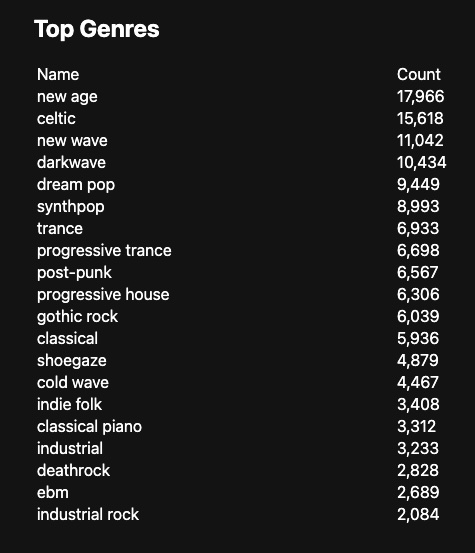
And the result is pretty much what I expected - when looking at my entire history, it's really Enya-weighted:
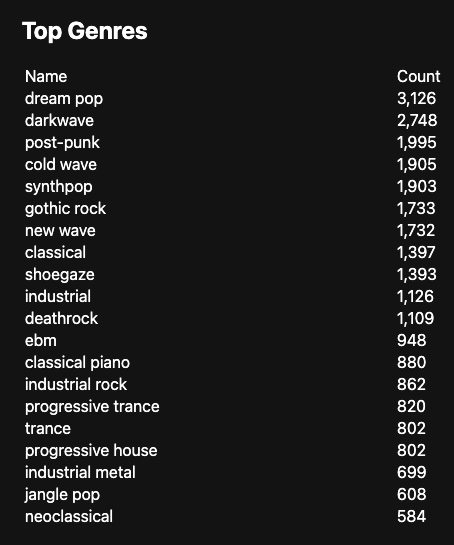
But if I filter to this year, it's a bit more on target:
Anyway, that's it, I'm done with Spotify demos, although definitely not done with Astro. If you want to look at the source, you can peruse it here: https://github.com/cfjedimaster/astro-tests/tree/main/spotifydata2