Building the Unicorn-themed app of my dreams with TinyJS

Everyone likes to talk about light versus dark theme while no one is addressing the real need for our users - a proper unicorn theme. I mean, take a look at this beauty:
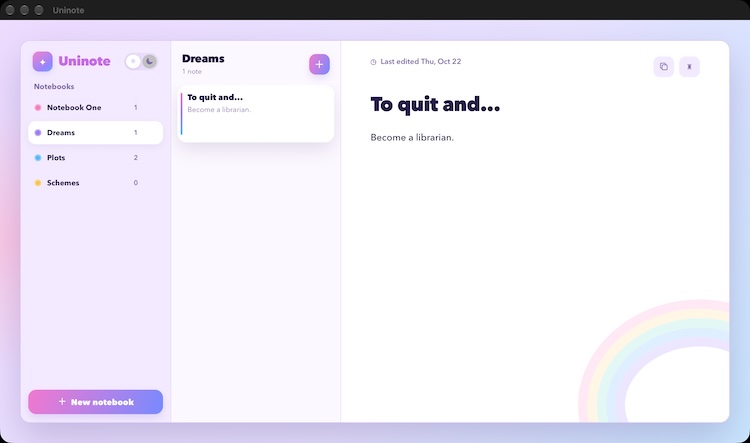
This is Uninote, a desktop note taking application that - well - takes notes. You create notebooks, write notes, and that's it. No AI features. Nothing complex, just a note taking app. I've had a love/hate relationship with these apps for years. I was a huge Evernote fan until it went to poo. I currently use OneNote and... it's ok but I wish it was better. And yes, before folks chime in with suggestions, I'm aware I've got choices, but I "share" note access with my wife so one of the caveats is that I need an app she's comfortable with and I can deal with as well.
That being said - TinyJS is a cool as hell platform to build desktop apps and I thought I'd try building a basic note application with it. You can peruse all the code you want, and if you clone the repo and use the CLI, run a build yourself (I don't have any plans to release a "real" app - maybe) if you want to see it in action. Most of it is "just" HTML, CSS, and JavaScript, so let me share some of the more interesting tidbits.
Design
Before getting into the code, let me talk about the design. I began in Claude and used this prompt:
im building a simple desktop app with TinyJS that is a note taking application,
like Evernote and OneNote. the app will be called Uninote, and is unicorn
themed. functionality is pretty simple - you have notebooks that have a name,
you can add, edit, and remove notebooks. notebooks have notes with a title,
last edited value, and just a block of text (no support for binary data). it
should support light/dark mode

can you give me 3 mocks for this - images only if you can, no HTML. as i said,
its unicorn themed so it should slick, but cute
Let me just say - I greatly appreciate AI tools that can deal with my typos. Claude did a pretty good job with the three mocks it created, but the design you see above was a clear favorite for me. While I love the light version, the dark version is pretty great as well:
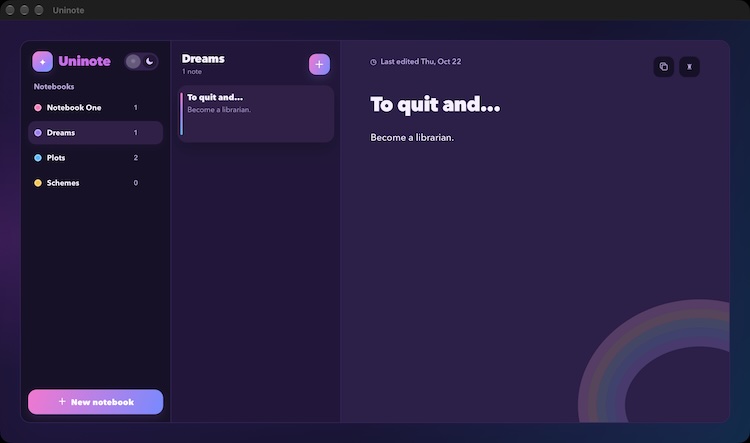
This blew away most of my daily Claude usage however, so I took it to Copilot in Visual Studio Code to convert the mock to HTML. I forgot to tell it to ignore the desktop UI (ie OSX app frame stuff) so I had to ask it to do that as a followup, but it worked well.
This was done in a new app scaffolded by the TinyJS CLI. As I mentioned in my first post, you can scaffold an app with Alpine and TypeScript, and Copilot had no issues going from mock to layout with that setup. From there, I basically "rolled back" the mock data into Alpine directives. So for example, my mock had a list of notebooks that I was able to convert to a proper list in Alpine based on data.
Code
So most of this is vanilla Alpine type stuff, where the interesting bit comes in is the persistence, which uses SQLite. SQLite access is provided in the "backend" code. You begin with one import:
import { Database } from 'tjs:sqlite';
And then handle your database initialization. For me it looks like so:
let db = null;

export const api = {
  initDB: async () => {
    db.exec(`
CREATE TABLE IF NOT EXISTS notebooks (
  id INTEGER PRIMARY KEY AUTOINCREMENT,
  name TEXT NOT NULL
);
     `);

    db.exec(`
CREATE TABLE IF NOT EXISTS notes (
  id INTEGER PRIMARY KEY AUTOINCREMENT,
  title TEXT NOT NULL,
  content TEXT NOT NULL,
  notebook_id INTEGER NOT NULL,
  created DATETIME NOT NULL DEFAULT CURRENT_TIMESTAMP,
  updated DATETIME NOT NULL DEFAULT CURRENT_TIMESTAMP,
  FOREIGN KEY (notebook_id) REFERENCES notebooks(id) ON DELETE CASCADE
);
     `);
    db.exec('PRAGMA foreign_keys = ON');

    return true;
  },
  // more stuff
}
My database is two simple tables - one for notebooks and one for notes. TinyJS takes any method defined in the api export and lets you call it from the client. So in my Alpine startup I've got:
async init() {
    await tiny.api.call('initDB')
    // more stuff
}
The rest of the 'CRUD' (Creating, Reading, Updating, Deleting), are just more DB calls. On the front end, I gather the data, pass it to the backend via tiny.api.call, and write the SQL back there.
So for example, to just get a list of notebooks:
// in the front end
this.notebooks = await tiny.api.call('getNotebooks')
And:
getNotebooks: async () => {
if (!db) throw new Error('Database not initialized. Call initDB first.');
return db.prepare(`
    SELECT notebooks.id, notebooks.name, COUNT(notes.id) AS noteCount
    FROM notebooks LEFT JOIN notes ON notes.notebook_id = notebooks.id
    GROUP BY notebooks.id ORDER BY notebooks.id
`).all();
},
That's basically it. Let me share two more little TinyJS bits. To copy to the clipboard, I did not use the usual web platform way, but rather:
await tiny.clipboard.write({ text: `${note.title}\n\n${note.content}` })
I'm not sure what that offers in contrast to the Clipboard API and will find some time to figure that out.
The second is a small thing, but super useful. Your TinyJS app has a 'controller' JSON file that lets you set a heck of a lot of properties. One of those is the window size:
"size": "960x640",
But out of the box, you can set a default size and have the app automatically remember the window size and position:
"size": "960x640",
"rememberWindows": true,
I was convinced I was going to need a "listen for window resize and persist" type logic but nope - one line in JSON. Perfect.
Photo by Annie Spratt on Unsplash