Tiny Apps with TinyJS

About a year ago, I was still running my live stream (Code Break) and my final three streams all covered one topic - building desktop applications with non-native code. I covered Tauri (HTML on the front, Rust on the back) and Flet (all Python). Recently I came across another option, tinyjs.
TinyJS (technically the name is "tinyjs" but I can't make myself use the lowercase in my writing like that ;) is a lot like PhoneGap/Apache Cordova. Your application is the system web view shipped along with the ability to make system calls via a bridge to txiki.js. This bridge gives you full access to the file system and more, like any other native app.
Unlike PhoneGap, this is just for desktop apps, which is fine, but I think the biggest selling point is the size of the bundled app - typically around 6 megs. That's tiny versus something like Electron.
It's got hooks into everything a desktop app could need, like native dialogs and OS menus and such. It can write securely to the OS's credential store, use SQLite, and even handle application updating.
I've just begun playing with it recently and I've got a few ideas for apps I want to build, but I thought I'd share a quick demo. This one's a bit ugly, and to be clear, that's on me. As it's a web view, you've got full control over how the end result looks. I was just going for something quick and dirty in my test.
First Steps
After doing a quick install, you can scaffold at the command line with:
tinyjs new appname
By default this scaffolds out a vanilla application (no React default, woot!) with a few files and folders - the important ones (at least initially while testing and learning) are:
- frontend - the UI/UX layer (HTML, CSS, JS)
- main.js - a "backend" file that lets you build services you expose to your front end code. This is where you do "system" stuff your frontend JavaScript can't do.
As an example, your backend code could use this:
export const api: Record<string, TinyApiHandler> = {
  hello: async ({ name }: { name: string }) => 'hi ' + name + ' — from the backend',
};
Which would then be available in the frontend as await tiny.api.call('hello', {...}).
Running the app is done via tinyjs dev which will load the app and enable HMR. In my testing, reloading was incredibly quick, but I didn't build anything large (yet).
Working with Alpine
The CLI has got a number of different scaffolds you can use, including Alpine. (And I should say - huge thanks to tarwin, the creator - who answered a lot of my questions via email and added stuff I asked for left and right!) I scaffolded one like that and one thing I'll note - the scaffold for different frameworks will differ a bit from the simple app you get by default. Each project has a tinyjs.json file which has metadata for the project, including where your backend file is and how the frontend works.
For my simple test, I wanted to check a few things. First, is CORS still enforced when using fetch? The short answer is yes, it is. The longer answer is that doesn't matter as you can use tiny.fetch instead. I thought it would be fun then to build a simple "RSS to HTML" application where I could enter an RSS feed and render the items.
I copied the browser distributable for the rss-parser project and simply included it in my HTML via a script tag. Here's the entirety of that file:
<!doctype html>
<html lang="en">
  <head>
    <meta charset="UTF-8" />
    <link rel="icon" type="image/svg+xml" href="/favicon.svg" />
    <meta name="viewport" content="width=device-width, initial-scale=1.0" />
    <title>RSS Parser</title>
  </head>
  <body>
    <section id="center" x-data="hello">
      <h1>RSS Parser</h1>
      <input x-model="url" placeholder="RSS feed URL" /> <button @click="parse">Parse</button>
      <template x-if="items.length > 0">
        <div>
        <h2>Items</h2>
        <ul>
          <template x-for="item in items" :key="item.link">
            <li>
              <a :href="item.link" target="_blank" x-text="item.title"></a>
            </li>
          </template>
        </ul>
        </div>
      </template>
    </section>
    <script src="/src/rss-parser.min.js"></script>
    <script type="module" src="/src/main.ts"></script>
  </body>
</html>
That's all regular Alpine.js stuff, nothing fancy there. Now for the JavaScript:
import './style.css';
import 'simpledotcss/simple.min.css';

import Alpine from 'alpinejs';

Alpine.data('hello', () => ({
  name: 'world',
  url: 'https://www.raymondcamden.com/feed.xml',
  items: [],
  async init() {
  },
  async parse() {
    const parser = new RSSParser();
    let req = await tiny.fetch(this.url);
    let res = await req.text();
    let feed = await parser.parseString(res);
    this.items = feed.items;
  },
  async ask() {
    // Every function in the backend's api object is callable from the page.
    this.reply = await tiny.api.call('hello', { name: this.name })
  },
}))

Alpine.start()
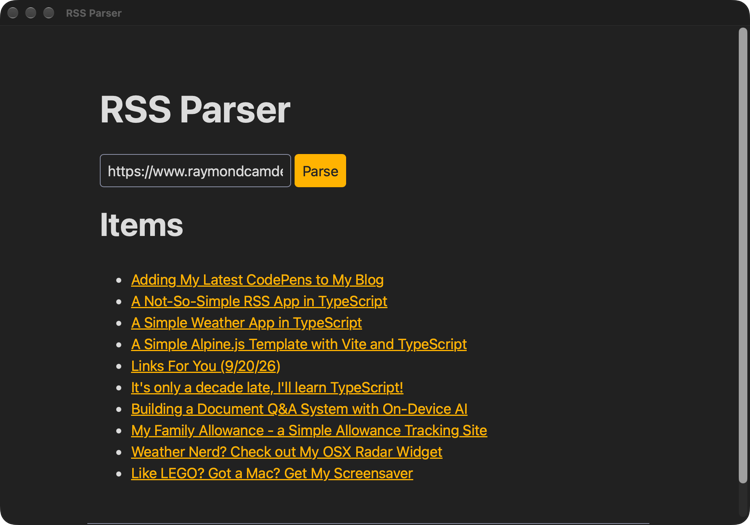
A few things to note here - I've got some junk in the file still, like the ask function which was a leftover from the scaffold. The important bit is the parse function. The RSSParser object has the ability to parse a URL, but it uses fetch and is blocked by CORS. So instead I get the XML via tiny.fetch and pass it to parseString. And that's literally it. Here's a screenshot of the application running:
More Info
The docs obviously are a great place to start, and if you're curious about more of how it actually works, there's a good explanation of that as well.
My next demo is going to be testing an OAuth login flow with the application. The project supports registering custom URL schemes which is typically how that's handled so it should be possible, but I want to test it out myself of course. :)
Photo by Lukas Blazek on Unsplash