Building a Form Handling Service in Val Town

Many years ago, I made the switch from building primarily app-server backed sites (using Node, ColdFusion, PHP, etc) to fully static sites using tools like Jekyll, Hugo, and Eleventy. For the most part, it was a great shift in how I build, but there were a few things I had to figure out in that new world - one of them was simple form handling. While I could have used serverless just fine, it felt like overkill. Luckily, there were a few services out there that catered to this need. You would simply use a unique action for your form and that service would handle collecting the form data, emailing it to you, and redirecting the user back to the site.
A great example of this, and one I used in the past, is Formspree. You can see an example right on their home page:
<!-- random form on your site -->
<form action="https://formspree.io/f/{form_id}" method="post">
  <label for="email">Your Email</label>
  <input name="Email" id="email" type="email">
  <button type="submit">Submit</button>
</form>
Emailing isn't the only option for processing the result of course. Formspree's home page lists a bunch of integrations you can use, like Airtable and Google Sheets. Another feature of these services is that various form fields will trigger different behaviors. For example, I can use a hidden form field to set where the form should redirect to after submission. Or, if there is a field named email, when the form data is sent to the site owner, set the reply value to that value.
So with that in mind, a few days ago, the Val Town folks blogged about various examples in the community (I had a few included too!). In that blog, they shared this post:
I run my forms now via a free val.town instance, very easy to setup with ai and no lock in
— meta (@metaend.eth.xyz) June 14, 2026 at 2:27 AM
That clicked with me - of course Val Town would be a great solution for handling form posts - and I wondered - could we build a generic service such that any form could use it?
I came up with the following requirements:
- First and foremost - the implementation should respond to regular form posts. In other words, I didn't want to build an API that would require JavaScript code in the form. Instead I wanted to follow the lead of services like Formspree and let you simply point your 'vanilla' form to a specific URL.
- The form should allow me to specify who gets the result. That's a huge security issue of course, so my service will have a white list of allowed email addresses.
- The form should allow me to specify where to redirect after submission. Like the above, this could be a security issue, so my service will have a white list of URLs that allow for partial matching, so you can allow foo.com for example and any redirect under that would work.
So far so good? Alright, let's look at the implementation.
Show me the code!
I'll link to the Val itself when done, but here's the entirety of the code, tied to a HTTP trigger so it can actually be used in forms:
import { email } from "https://esm.town/v/std/email";

/*
We are only allowed to send to one of these.
*/
const SAFE_EMAILS_TO = [
  "raymondcamden@gmail.com",
  "rcamden@gmail.com",
];

/*
A URL that is matched against redirects - the redirect must match the domain, well anything _after_ the input
*/
const SAFE_REDIRECT_TO = [
  "https://boring-morning-yak.codepen.app",
];

/*
The 'special keys' don't need to be in the form email.
*/
const SPECIAL_KEYS = ["_send", "_redirect", "_formname"];

/*
Every form must have a _send and _redirect field. Later we may add more validations.
Like validating _redirect. Duh.
*/
function verifyForm(f) {
  console.log("verifyForm", f.get("_send"), f.get("_redirect"));

  if (!f.get("_send") || f.get("_send").length === 0) return false;
  if (!f.get("_redirect") || f.get("_redirect").length === 0) return false;

  // ensure the email is ok
  if(SAFE_EMAILS_TO.indexOf(f.get("_send")) === -1) return false;

  //now ensure _redirect matches against at least one
  let validRedirect = false;
  const redirect = f.get("_redirect").toLowerCase();

  SAFE_REDIRECT_TO.forEach((u) => {
    u = u.toLowerCase();
    if (redirect.startsWith(u)) validRedirect = true;
  });

  return validRedirect;
}

/*
As there are multiple things that can go wrong, here's the general
error handler. As this is meant for Form POSTs, its ok to give a simple response.
*/
function returnError() {
  return new Response(
    "<!doctype html><meta charset=utf-8><title>500</title><h1>500 — Server Error</h1><p>Sorry, something broke on our end.</p>",
    { status: 500, headers: { "Content-Type": "text/html; charset=utf-8" } },
  );
}

export default async function (req: Request): Promise<Response> {
  let formData;
  const obj: Record<string, string> = {};

  try {
    formData = await req.formData();
    console.log("fd", formData);
  } catch (_e) {
    return returnError();
  }

  if (!verifyForm(formData)) return returnError();

  const redirect = formData.get("_redirect");

  let formName = "";
  /*
  One special field is _formname. If we have it, we include it
  in the subject + email
  */

  if (formData.get("_formname")) {
    formName = formData.get("_formname");
  } else {
    formName = `Form at ${req.headers.get("referer") ?? "unknown"}`;
  }

  const subject = `Form submission: ${formName}`;

  for (const key of new Set(formData.keys())) {
    obj[key] = formData.getAll(key).map(String).join(", ");
  }

  let html = `
<h2>Form Submission - ${formName}</h2>
<table>
  `;

  for (const [key, value] of Object.entries(obj)) {
    console.log(key, value);
    if (SPECIAL_KEYS.indexOf(key) === -1) {
      html += `
      <tr><td style="min-width:300px">${key}</td><td>${value}</td></tr>
      `;
    }
  }

  html += `
</table>

<p>
Form submitted at ${new Intl.DateTimeFormat("en-US", { dateStyle: "short", timeStyle: "short", timeZone: "America/Chicago" }).format(new Date())}.
</p>
  `;

  console.log(html);

  const emailOptions = {
    // to: "someone_else@example.com", this would be formData.get('_email')
    html,
    subject,
  };

  if (obj["email"]) emailOptions.replyTo = obj["email"];

  await email(emailOptions);

  return new Response(null, {
    status: 303,
    headers: { Location: redirect },
  });

}
Up on top, you can see the various security variables I use to ensure the service can't be abused. I've got a list of emails that can receive the form data and a list of URLs where the user can be redirected. Again, the URLs are partially matched so you can do anything as long as it matches at the beginning.
The next variable, SPECIAL_KEYS, is just used to filter out the 'meta' values for my service and not include them in the email. This just reduces the noise for the reader.
The verifyForm handles checking our two required form fields. _send sets the recipient of the form data and _redirect handles where to go when done. For both, they have to exist, and then I check for valid values against the two variables defined on top of the script.
returnError is just a utility function to render an error. This can happen if the form didn't have the required, or correct values, or if there is an error reading the form data. I use a simple 500 error but I could imagine redirecting to an error page on the calling site instead.
Finally - the core default function does the real work. I get my form data, verify it, and then create an email. I've got code that looks for a hidden form field, _formname, which lets you give a nice label to the email.
The only real tricky part here is handling multi-value form fields, like checkboxes for example. The for loop over formData.keys() handles this and I've got Val Town's AI service to thank for the help here. I had an idea of how I was going to handle this, but the AI service suggested the code you see and honestly it was much better than what I would have written. More on the AI stuff in a second.
The last bit is just the email. Now, in a "real" implementation of this, I'd use an email service instead of Val's built-in service, but it works well enough for this demo. You can see the docs for their service to understand exactly what it can and cannot do, but the big thing for this demo is that I'm on the free tier so I can't specify the 'to' value. Note that I look for email in the form and if set, use that as the replyTo value. I call that out in my code so just note if you fork my Val and use it yourself, change this if you are on the paid tier. Or switch to an email service. You get the idea.
The Demo
Ok, finally, I built a simple CodePen form to show this in action: https://boring-morning-yak.codepen.app/. On this page you will see three forms. The first one is intentionally bad and results in a 500. The next two should work and will email me so - thanks for that. ;)
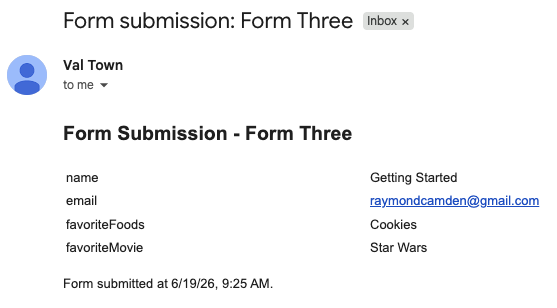
Here's an example of the email sent out:
Final Thoughts
Ok, before I ramble on a bit, you can find my val here: https://www.val.town/x/raymondcamden/form-bouncer. If you use it, let me know! Now for some things to consider.
- My form does not handle file attachments. It could, but you would need something a bit more complex for that. Val Town has blob support so you could store it there, but I'd probably consider a private S3/R2 bucket instead. You could generate a link and include it in the email. You would have to also build something to handle removing old files from the bucket eventually. You would also want to sanity check the file types and sizes. Doable - but more work than I wanted to for this demo.
- For form fields that can be null, like checkboxes and radio elements, they don't show up in the email at all. I could imagine a few ways around that. You could use a hidden form field to specify things like that. Maybe:
<input name="_nullField" value="favoritemovie,favoritefoods" type="hidden">. The code would notice if one of these items isn't present and then render it in the email at least so it's clear the value was blank. - Another idea I had would be specifying 'friendly' labels for form fields. So example, my favorite movie comes out as
favoriteMovie: Star Wars. If the idea here is to make "human readable" form results, I could see perhaps supporting something like this:<input name="_favoriteMovie_label" value="Favorite Movie" type="hidden">. - For validation, I'd do that all in the client, and by that I mean HTML first and then JavaScript.
And finally, Val Town's had an AI assistant for a while, but I never bothered with it till this demo, and damn was it useful. Not only did it help me with parsing the form object, it also reminded me of various aspects of the Request object that for the life of me I struggle to remember. It was a great companion. I will say on the free tier it doesn't take long to hit the limit, but I was able to get all the help I needed before I maxed it out. (I did get to a warning though.) Val Town's got a lot of good reasons to consider paying for it, and this is just one more. (I don't have a job and I just build dumb demos, so that's my excuse. ;)