Creating a Heavy Rain Alert with RainDrop and Val Town

One of the "joys" of living in Louisiana is the rainy season, which is heavier in spring but honestly, feels like it lasts all year long. I can still remember being on a business trip in 2016, about to fly home, and hearing about some sort of 'rain event' back in Louisiana. This surprised me as there wasn't a hurricane involved, just an incredible amount of rain (up to 2-3 inches per hour). You can read more about it on the Wikipedia page about the event, but it goes without saying - rain is a big deal down here.
A while back I discovered RainDrop, which is an app and a web site that lets you check on rainfall totals. You can see my zipcode here, https://www.raindrop.farm/rainfall-totals/zipcode/70508#map, and while we aren't having any rain this second, we've got some forecast for today.
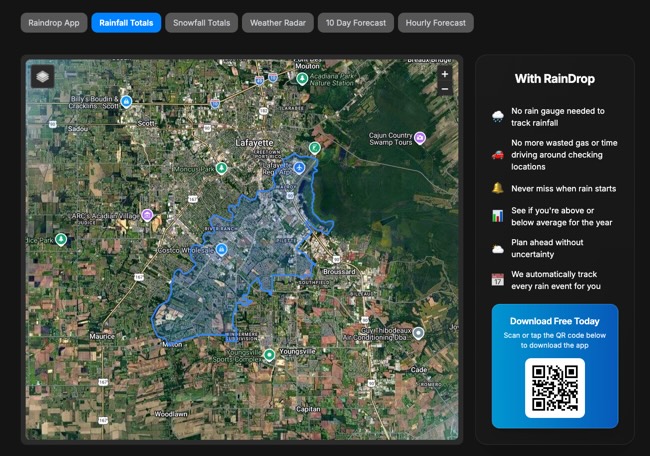
When I discovered the site, I did some digging and discovered they had an API: https://api.raindrop.farm/docs. This API gives you incredibly detailed information about rainfall (and snow) and can even return historical data.
Given an API key passed in an Authorization header, this gets the current precipitation for my location:
https://api.raindrop.farm/v1/precipitation/current?lat=30.216667&lon=-92.033333
Which returns (as of 11:34 AM, and I just heard thunder):
{
    "lat": 30.216667,
    "lon": -92.033333,
    "timestamp": "2026-06-01T16:30:00Z",
    "precipitationIntensity": 0.0
}
Ok - slight delay here - I just got out of a meeting, and the rain is here:
{
    "lat": 30.216667,
    "lon": -92.033333,
    "timestamp": "2026-06-01T17:06:00Z",
    "precipitationIntensity": 1.2999999523162842
}
That value is in millimeters per hour so it looks like just a trickle, so nothing to worry about. Of course, what if it was something to worry about? I thought - why not automate checking for this using my go to platform lately, Val Town.
The App
Alright, so the app I had in mind was fairly simple:
Every X minutes, use the RainDrop API to check the rain intensity and if it is over a certain threshold, send an alert my way.
My RainDrop API access had pretty high usage limits (120 a minute) that were above what made sense to realistically check. On the other hand, my free tier level at Val Town capped me at one execution per fifteen minutes.
To be honest, once every fifteen minutes seemed perfectly reasonable, but keep in mind that both RainDrop and Val Town would support much higher frequencies if necessary.
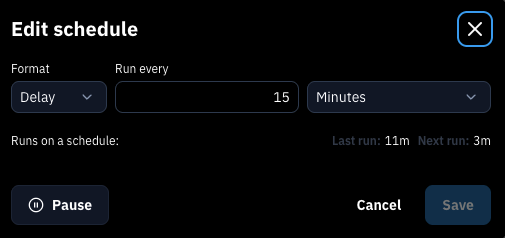
Given the above, I created a new val and set the trigger to Cron, set to every 15 minutes:
I then created an environment variable for my RainDrop key. With that in place, the entire "early warning flood system" (that's what I'll call it when doing interviews for my next job) is one file:
import { email } from "https://esm.town/v/std/email";

/**
 * Converts speed from millimeters per hour to inches per hour.
 * @param {number} mmPerHour - Speed in millimeters per hour.
 * @returns {number} Speed in inches per hour.
 */
function mmPerHourToInchesPerHour(mmPerHour) {
  return mmPerHour / 25.4;
}

function dtFormat(timestamp) {
  const date = new Date(timestamp);

  const options = {
    weekday: "long",
    year: "numeric",
    month: "long",
    day: "numeric",
    hour: "2-digit",
    minute: "2-digit",
    timeZoneName: "short",
  };

  // Create the formatter (e.g., for US English)
  const formatter = new Intl.DateTimeFormat("en-US", options);

  return formatter.format(date);
}

export default async function (interval: Interval) {
  // Lafayette, LA
  const lat = "30.216667";
  const lng = "-92.033333";

  // The threshold value is inches of rain per hour - any value >= will trigger a warning
  const threshold = 0.5;

  let key = Deno.env.get("API_KEY");
  let precipReq = await fetch(
    `https://api.raindrop.farm/v1/precipitation/current?lat=${lat}&lon=${lng}`,
    {
      headers: {
        "Authorization": key,
      },
    },
  );

  let precip = await precipReq.json();
  let rainInches = mmPerHourToInchesPerHour(precip.precipitationIntensity);
  console.log("rainInches", rainInches);
  console.log(precip);

  if (rainInches >= threshold) {
    let html = `
<h2>Heavy Rain Alert</h2>

<p>
As of ${
      dtFormat(precip.timestamp)
    }, we have detected ${rainInches.toFixed(2)} inches of rain per hour.
</p>
    `;

    await email({
      subject: "Rain Alert",
      html,
    });
  }
}
On top of my script are two utility functions with the interesting one being the simple wrapper to convert RainDrop's values to inches.
After that, I hit the API, check against a threshold (currently set to half an inch), and if it matches, I fire off an email. As a reminder, I'm using Val Town's built in "mail the owner" feature. I could also use a proper email API to have more control over the delivery, but this works well for now.
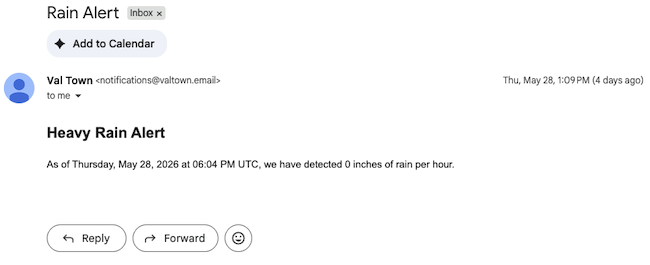
And of course, as soon as I built this there were no events, which is good I suppose, but I did a quick tweak to force it to email and here's an example. Not terribly thrilling with 0 inches:
If you want to play with this, you can fork the val here: https://www.val.town/x/raymondcamden/raindropAlert. And of course if you do, let me know!
Photo by reza shayestehpour on Unsplash