Send me a message in a panel...

On my birthday a few weeks ago, one of things I got was something I've wanted to play with for a while, the Divoom Pixoo64 pixel frame. This is pixel art frame you can hang on your wall and with an app, select art, clock faces, and more. It's fun, although the app itself isn't my favorite. But - what excites me is that it has an API you can use to change what's shown on the frame. I actually built a demo of this with Webflow you can see below:
I was thinking about how else I could play with the API and decided to do something a bit risky - build a tool that lets you (yes, you!) send me a message right to my device. How did I do it? Let me describe the process from the bottom up.
The Python Server
At the lowest level is a Python server running on my machine. Yes, this isn't persistent and not stable, but who cares. The server handles accepting a string to display and rendering it on the Pixoo:
from http.server import ThreadingHTTPServer, BaseHTTPRequestHandler
from urllib.parse import urlparse, parse_qs
from pixoo_ng import Pixoo, Channel
from pixoo_ng.config import PixooConfig
import time

def split_string(text: str, max_chars: int) -> list[str]:
    """Split a string into chunks of up to max_chars characters, without breaking words."""
    words = text.split()
    chunks = []
    current = ""

    for word in words:
        if not current:
            current = word
        elif len(current) + 1 + len(word) <= max_chars:
            current += " " + word
        else:
            chunks.append(current)
            current = word

    if current:
        chunks.append(current)

    return chunks

class Handler(BaseHTTPRequestHandler):
    def do_GET(self):
        if self.path == '/favicon.ico':
            self.send_response(404)
            self.end_headers()
            return

        query = parse_qs(urlparse(self.path).query)
        input_text = (query.get('input', [''])[0]).strip()

        if not input_text:
            self.send_response(400)
            self.end_headers()
            self.wfile.write(b"Missing 'input' query parameter")
            return

        pix = Pixoo(PixooConfig(address='192.168.0.191'))

        startY = 5
        strings = split_string(input_text, 15)

        for line in strings[:8]:
            print(line, startY)
            pix.draw_text(line, (2, startY), (0, 255, 0))
            startY += 5

        pix.push()

        self.send_response(204)
        self.end_headers()
        self.wfile.flush()

        # Show it for 10 seconds...
        time.sleep(10)

        # Then go back to my regular face
        pix.set_channel(Channel.FACES)
        pix.set_face(0)

    def log_message(self, format, *args):
        print(f"{self.address_string()} - {format % args}")


if __name__ == "__main__":
    server = ThreadingHTTPServer(("", 8099), Handler)
    print("Listening on port 8099")
    server.serve_forever()
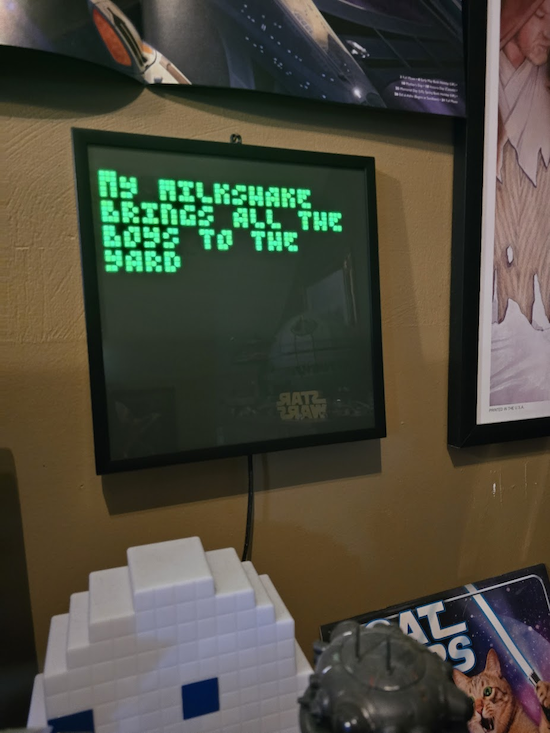
The important bits is how it handles dynamic strings. When you send text to the Pixoo, you have to handle ensuring it actually fits, so to do that, I used a function, split_string, which wraps text on words into an array. I then take that array (up to 7 lines) and send each line progressively lower on the panel.
Here's an example:
To make this little server "live", I simply used ngrok to expose it.
Calling the Server
To call the server, I set up an API route on https://val.town that does the minimal work of proxying a front end call:
export default async function (req: Request): Promise<Response> {
  const body = await req.json();

  //trim message to 80
  let msg = body.message.substring(0, 80);
  let API = Deno.env.get("API");
  console.log(`Sending ${msg}`);
  await fetch(API + `?input=${msg}`);

  return Response.json({ ok: true });
}
The ngrok URL is an environment variable and as I don't care about the response, I return a basic boolean value back.
The Front End
And lastly, I used Claude to build a simple front end. It's just a form with a field and button:
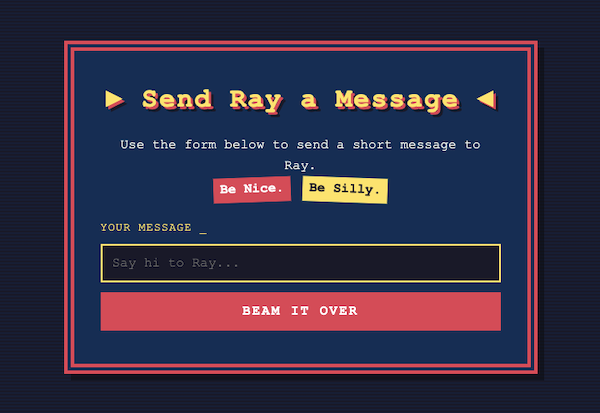
The JavaScript literally just takes the field and sends it to the server code above, but if you want to see the complete project, you can check it out on val.town: https://www.val.town/x/raymondcamden/send-me-a-message
Want to try it? I'll share the URL, but first...
Privilege
I feel safe sharing this demo as my device is in my office, a room my kids don't go into, and I can shut it down in seconds. Heck, I'll probably forget it's running and next time I boot this machine, it won't run anyway. So yeah, no big deal.
But also - I'm a guy. Probably the worst thing I'll get is someone calling me foul names.
I can't imagine there is any world where a woman would feel safe with this kind of connection to random people on the internet.
Try It
Ready to try it? I make no guarantees it will work, but then again, you'll never know. ;) Hit the form here: https://raymondcamden--45cb2f404fa111f1b5dcee650bb23af1.web.val.run/
Photo by Jayne Harris on Unsplash