Using Val Town and Gemini for Sports Ball Stuff

This is trivial as heck as the kids say, but I really want to explore Val Town more this year and I thought of a great, and simple use for it. Both my wife and I are big Saints fans (this is their year, honest) and attend most of the games. If they're not playing at home, we're absolutely watching it on TV. We both really enjoy watching football, but honestly, not enough to watch ESPN and follow the news.
I thought - why not simply get a summary of NFL news from the past week and build an automation of it? I had this running in less than ten minutes with Val Town.
First, the code makes use of Google's Node SDK for working with Gemini. I setup my environment variable first and then used this code:
import { GoogleGenerativeAI } from "npm:@google/generative-ai";
import { email } from "https://esm.town/v/std/email";
import { marked } from "npm:marked";

const genAI = new GoogleGenerativeAI(Deno.env.get("GEMINI_API_KEY"));
const model = genAI.getGenerativeModel({ model: "gemini-2.5-pro" });

const prompt = `
  Act as a sports news curator. I am a casual football fan who watches games on Sundays
  but avoids ESPN.

  Provide a high-level summary of NFL news from the past 7 days.

  Requirements:
  - Length: 3-4 paragraphs.
  - Include relevant links for further reading.
  - Tone: Informative but accessible for a casual fan.
  - Focus: Major trades, schedule updates, and significant roster moves.

In your response, don't mention the prompt per se, just give me the summary report.
For each item in your report, generate a heading title.
`;

async function getNFLSummary(p) {
  try {
    const result = await model.generateContent(p);
    const response = await result.response;
    return response.text();

    console.log(text);
  } catch (error) {
    console.error("Error generating report:", error);
  }
}

let summary = await getNFLSummary(prompt);
console.log(summary);

let html = `
<h2>NFL News Summary</h2>

${marked.parse(summary)}
`;

await email({
  subject: "NFL News Summary",
  html,
});
The prompt is pretty specific and grew as I tested. The final paragraph in particular was necessary as I kept getting "chat" like responses which wouldn't make sense for an email report. I also had to ask specifically for titles for the summaries which makes it easier to skip over things I don't care about. Lastly, I considered adding a note about focusing on the Saints, but I really wanted something more generic, especially as we tend to hear a lot of Saints news via local updates and such.
And the last bit just sends an email to me, from Val Town, as I don't need a custom FROM/TO here, this works just fine.
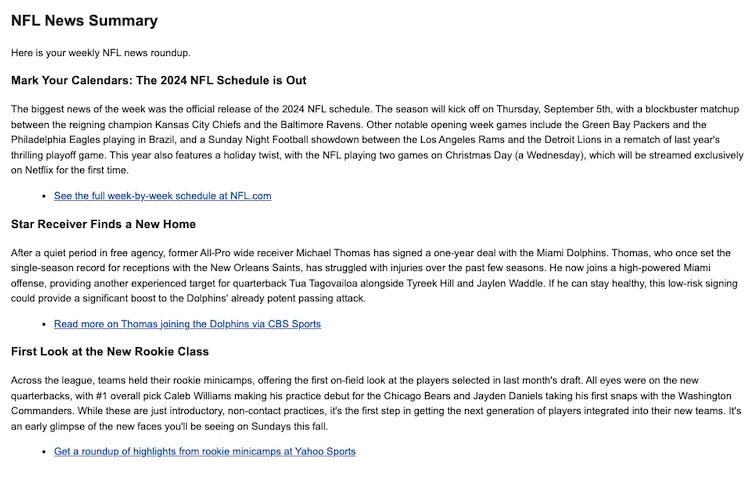
The last, last bit was the CRON schedule which I set as the trigger and for 9AM on Mondays. Doing a quick run produces this:
I've embedded the Val below - let me know if you fork it!
Photo by Dave Adamson on Unsplash