Using Val Town to Get Me to the Movies

My wife and I both love going to the movies, but sometimes a few months will go by without us making it out there. Mostly we just forget what's coming out and don't realize till it's already on a streaming app. I thought it would be nice to build a tool that could help remind me of upcoming movie releases so we can make our theater going more of a consistent habit. To accomplish this, I used the The Movie Database APIs and Val Town.
The First Version
Before I even considered building a tool like this, I investigated the TMDB reference to see how easy it was to get upcoming releases. Turns out, there've got an endpoint just for that: Upcoming Movies If you carefully read the docs, you'll see this is just a shortcut to the more flexible Discover endpoint, but as it was out of the box, it worked fine for me. The only tweak I had to do was add the US region.
This simple function handled everything for me:
async function getUpcomingMovies() {
let resp = await fetch('https://api.themoviedb.org/3/movie/upcoming?language=en-US&page=1®ion=US', {
headers: {
'Authorization': `Bearer ${TMDB_KEY}`,
'accept':'application/json'
}
});
let data = await resp.json();
return data;
}
With the help of Oat, I built a simple HTML table rendering the results. I started with this HTML:
<html>
	<head>
	</head>

	<body data-theme="dark">
		<div class="container">
		<h1>Upcoming Movies</h1>

			<div id="movieDisplay" class="mb-4"></div>

		</div>
	</body>
</html>
And then a bit of JavaScript (this is everything except the function I just shared above):
let $movieDisplay, $title;

document.addEventListener('DOMContentLoaded', init, false);
async function init() {
	$movieDisplay = document.querySelector('#movieDisplay');
	$title = document.querySelector('h1');

	let movies = await getUpcomingMovies();
	let html = '';

	movies.results.forEach((m,x) => {
		console.log(x,m);
		if(x === 0) {
			html += '<div class="row mt-4">';
		} else if(x % 3 === 0) {
			html += '</div><div class="row mt-4">';
		}
		html += `
<div class="col-4">
<article class="card">
  <header>
    <h3>${m.title}</h3>
  </header>
  <p>${m.overview}</p>
	<img src="https://image.tmdb.org/t/p/w300/${m.poster_path}">
  <footer class="flex gap-2 mt-4">
	Releases ${m.release_date}
  </footer>
</article>
</div>
		`;
	});

	$movieDisplay.innerHTML = html;

	$title.innerHTML += ` (From ${movies.dates.minimum} to ${movies.dates.maximum})`;
}
You can check out the running demo here:
See the Pen Upcoming Movies by Raymond Camden (@cfjedimaster) on CodePen.
You will notice, probably, it depends on when you run this, that some movies have release dates in the past. These are re-releases so the release date value is accurate, if confusing at first. I considered removing these, it would be simple enough to just compare the date to the current date, but both my wife and I have enjoyed watching re-releases so I kept it in.
By the way, we are both super excited about the Peaky Blinders movie.
Creating the Reminder in Val Town
The next bit was trivial - the only real issue I had was just being somewhat rusty with Val Town. I began by creating a new val, just for the movie logic. The only real change is that I'm getting my key from an environment variable rather than hard coding as I did in the CodePen above. (The key is a read only key so I don't have any concerns there.)
The next bit was to add a val and specify the cron trigger. I then imported the first val, crafted my HTML (a bit simpler than the CodePen demo), and emailed it. Val Town supports emailing yourself on the free plan, and that was perfect for my needs. You can see all the code here:
import { getUpcomingMovies } from "./main.ts";
import { email } from "https://esm.town/v/std/email";

// Learn more: https://docs.val.town/vals/cron/
export default async function (interval: Interval) {
  const movies = await getUpcomingMovies();
  let html = "";

  movies.results.forEach((m, x) => {
    html += `
    <h3>${m.title}</h3>
	<img src="https://image.tmdb.org/t/p/w185/${m.poster_path}" style="align:left">
    <p>
    ${m.overview}
    </p>
    <p>
	Releases ${m.release_date}.
    </p>
    <hr>`;
  });

  await email({
    subject: "Upcoming Movie Releases",
    html,
  });
}
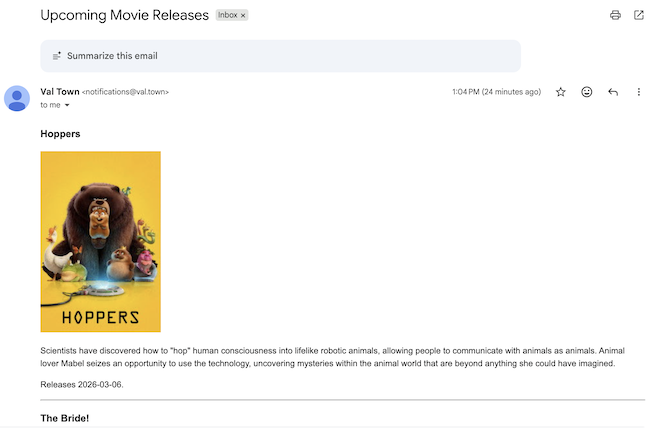
I specified Sunday at noon, but ran a few quick tests to confirm:
You can check out the complete project here: https://www.val.town/x/raymondcamden/UpcomingMovies