Building a UI for Gemini File Stores

Back in November of last year I wrote up a blog post talking about a new (at the time) Google Gemini feature, File Stores: "Gemini File Search and File Stores for Easy RAG". In that post I discussed what it was, how it worked, and built up a simple example. You should definitely read that post first, but if you want the TLDR, here ya go:
File Stores (referred to as "File Search") expands on Gemini's previous ability to work on files in a temporary fashion by allowing you to create a permanent "store" of folders. You can use this for RAG systems and use flexible metadata filter for complex queries.
This feature has been out for a few months now and I've wanted to play with it more, but found myself facing an issue - I'm lazy. Ok, not lazy, I just wasn't looking forward to the "setup" work to a) create the store once and b) populate the store before I could c) do GenAI powered searches against it. To be clear, this isn't an issue with the APIs, it's just the work you need to do ahead of time. It occurred to me that Google should provide a simple web-based tool for this, maybe not for production use, but for proofs of concepts and such. Since there isn't one (at least that I know of), I decided to build one.
The Gemini File Stores App
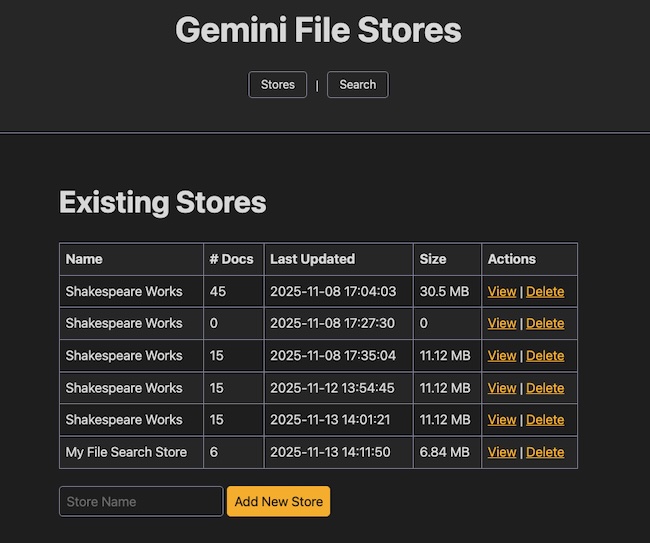
My application is a simple Python Flask web app meant to be run locally with your Gemini API key defined in an environment variable. On starting up, you're presented with a list of your stores:
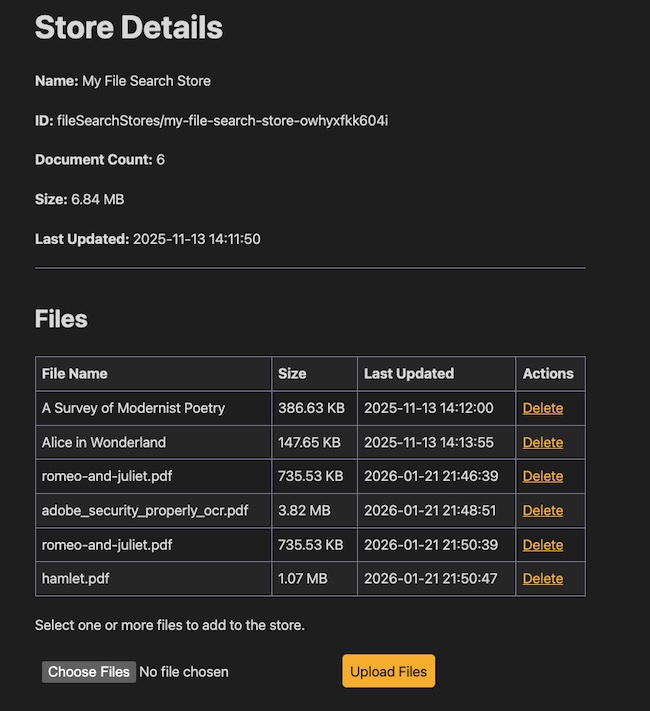
Clicking on View gives you a detailed listing of files, along with a chance to delete or upload new files:
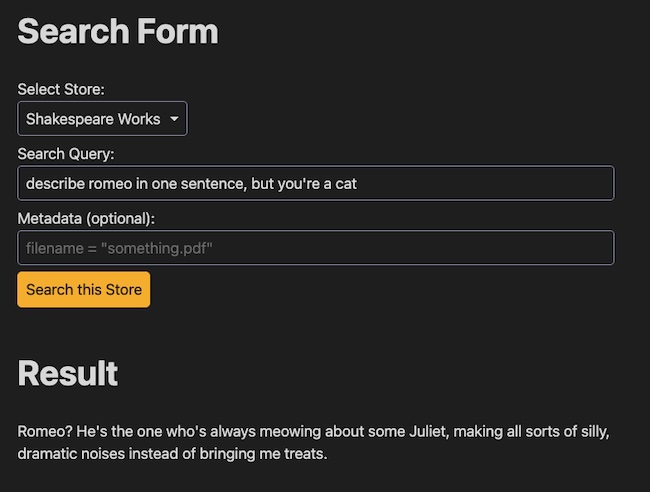
The search interface lets you pick a store, enter a query, and supply optional filtering. As I mentioned, the Gemini API here is pretty powerful. You could imagine a set of product diagrams that are categorized by type tied to a search interface that lets you select a product type before you ask questions.
As I mentioned, the idea is that this is a local application. You download the bits here (note, this isn't a stand alone repo, it's part of a bigger one - if this takes off I'll move it), copy your Gemini API key to the environment as GEMINI_API_KEY, install the dependencies (I don't have a requirements.txt file yet - will add one soon), and run it with flask run.
How Was It Built?
Ok, so this is the interesting part, at least to me. I started off using Visual Studio Code's built-in AI agent to create mock UI files, you can find them here: https://github.com/cfjedimaster/ai-testingzone/tree/main/stores_ui/mockui. This worked fine, but I realized I'd rather use Gemini to build a Gemini app so I then switched to Gemini's AI chat in Visual Studio Code and started doing my real work there. I absolulutely did not vibe code the whole thing. I absolutely did use AI to generate things bit by bit, which I then tweaked and tested, and iterated. This felt much safer than trying to do the whole thing at once.
Here was my first prompt:
this folder is for a new application that will work with Google Gemini
File Stores. The mockui folder contains my mocks for how I invision
the application being built out. I want you to create a new Flask
application. The application will require a GEMINI_API_KEY set in a
.env file, ie the application runs assuming a valid key. For now,
just build the first page that shows a list of existing stores
for the account. When building, put all Gemini related calls
in it's own Python class.
And later prompts were small bits here and there, basically handling the simple stuff I didn't need to write by hand. For the most part this just worked, although at times it hallucinated Gemini Python SDK methods that didn't actually exist. This is where I appreciated the fact I was doing things in small chunks - it made it easier to confirm, test, modify, and move on.
Here's an example from later in the process:
modify app.py, a Flask app, to add a new route called storesearch.
This route will be called by front end JavaScript and should look
for 3 parameters - store, prompt, and metadataFilter. these args
are passed to the search_store method in gemini_service.py.
the results are returned in json
I really dug this approach. I let the AI agent the more rote, boring aspects and I focused on getting the UI/UX just right. This AI thing might have a future. Maybe.
Anyway, let me know if this is useful!
Photo by Omar Hassan on Unsplash