Static site hosting on Google Cloud
A few days ago I blogged about my experience using Google Compute for site hosting. Tonight I set up a new static site and I decided to use Google Cloud Storage and I thought I'd share a few notes about how it went.
The docs are pretty good so I won't bother repeating what is there. I will say the first big trip up I ran into was verification. I wanted to create a bucket for githubhealth.raymondcamden.com. If you follow me on Twitter (@raymondcamden) then you may have seen the messages and screenshots I've been sharing of a tool that will let you check the relative "health" of your GitHub projects. I'm going to blog about that tomorrow, but I had some free time tonight so I thought I'd go ahead and set up the hosting. When I tried to make a bucket with the same name as the site, Google's online tool would not let me. It said I needed to verify the site first.
That seemed like a bit of a Catch 22. How do I verify a site when I plan on hosting the site via the bucket? Luckily though you can also do verification via adding a TXT record. GoDaddy makes this pretty easy and Google was able to verify it within about ten minutes.
After I had the bucket created, I had to get the files uploaded. Transmit (an OSX FTP client) has support for S3 sites built in, but I don't know if they support Google Cloud Storage. But my former boss, and current head of Google Cloud Evangelism at Google, wrote a blog post a few days ago talking about how to use the command line tool to work with buckets. I mentioned how cool the command line stuff was for Google Compute and it is just as cool for Cloud Storage. I used one command to copy my files up and another to set permissions.
The last step was to enable an index page for the bucket, which could have also been done via the CLI, but I used the web-based administrator instead.
If I remember right, Amazon made the security part of site hosting a real pain in the rear. You had to find some funky XML snippet and paste it in. Google has them beat here as far as I can tell. The only part I didn't really care for was verification, but I can get over that.
Any way, I guess that's it. If you decide to use Google's Cloud Storage, let them know I sent you their way. For every five referrals I get a free copy of Chrome.
If you're curious about the UI, here's my bucket list (heh):

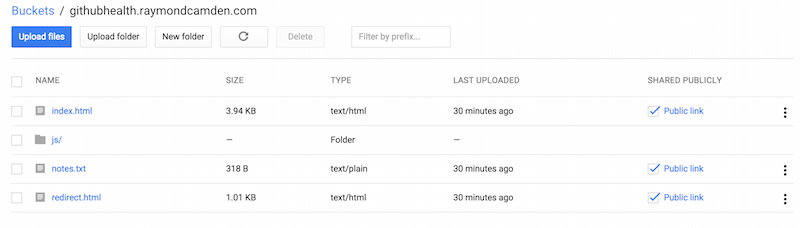
And a detail view of my static site bucket:
If you want to hit the site (and again, I'll blog about it more tomorrow), you can do so here: http://githubhealth.raymondcamden.com.