A Quick Demo of Gemini's Decisions API

Yesterday, Google formally released their new Decisions API, and it's a pretty important new addition to Gemini in general, so I thought I'd share a quick introduction and demo to give you an idea of how it can be used. Of course, the first thing I need to do is explain what it is and why you should care.
Decisions API?
Generative AI has been able to answer questions since the beginning. Where the difficulty lies is in turning those answers into machine readable output. What do I mean by that? I can write code that takes a photo and asks my AI service what's in the photo. So for example - I pass this photo to Claude:

I asked, "what's in this picture", and got:
Cool. But what if I wanted to only know if there is a cat in the picture? If I make my prompt "just answer one question - is there a cat in this picture?" I get a nice "Yes" back. Again, cool.
But doing this in code makes things a bit fuzzy. Like, what if my agent came back with "Yep" or "There is a cat"? Usually the way around this is with passing schema to the agent. Gemini supports structured outputs where you define a JSON schema and tell the agent to respond using it.
For example:
{
  "type": "object",
  "properties": {
    "isCat": {
      "type": "boolean",
      "description": "True if the image contains a cat, false otherwise."
    }
  },
  "required": ["isCat"]
}
This will then give me JSON my code can work with in a programmatic manner. Once again, cool, but... this could be better.
Way back in September, TypeSafe released Jev. Wikipedia defines it as a "discriminative model", not generation. Instead of outputting text, or JSON (which is still text of course), the result is a decision essentially. You still pass it an input that kinda resembles JSON schema, but instead can be thought of as defining what the result will be from the model. The model isn't going to "generate" text, but answer the input. That's probably a bit fuzzy, but hopefully the demo will help clear it up.
This input comes in the form of:
- Yes and no questions (referred to as a noul)
- A set of choices
- A scored item
The Jev Wikipedia page has a good example:
"new_noul_1": {
  "type": "noul",
  "instructions": "<true/false question>",
  "criteria": { "true": <entry>, "false": <entry> }
},
"new_choice_2": {
  "type": "choice",
  "instructions": "Which option fits the state?",
  "criteria": { "option_0": <entry>, ..., "option_n-1": <entry> }
},
"new_score_1": {
  "type": "score",
  "instructions": "Where does the state fall on the scale?",
  "criteria": ["option_0": <entry>, ..., "option_n-1": <entry>]
}
The biggest benefits of an API like this are speed and cost.
Gemini's Support
I linked to the announcement above where you can find more details on the cost and such, and I'll go ahead and steal their demo as a good initial example:
from google import genai

client = genai.Client(http_options={"api_version": "v1beta"})

result = client.decisions.create(
    model="gemini-decision-1",
    input=[{
            "type": "image",
            "uri": "https://storage.googleapis.com/generativeai-downloads/images/spill.jpg",
            "mime_type": "image/jpeg",
        },
        {
            "type": "text",
            "text": "Breakroom counter check before the 9 AM client meeting.",
        },
    ],
    questions={
        "has_spill": {
            "type": "noul",
            "instructions": "Is there an uncleaned liquid spill on the counter?",
        },
        "next_action": {
            "type": "choice",
            "instructions": "Which cleanup action fits the scene?",
            "criteria": {
                "wipe_with_cloth": "Small counter spill with a cloth or towel already nearby.",
                "dispatch_janitorial": "Large floor hazard, broken glass, or active leak.",
                "ready_for_meeting": "Counter is clean and ready.",
            },
        },
        "severity": {
            "type": "score",
            "instructions": "Rate the severity of the counter mess.",
            "criteria": [
                "Clean and ready.",
                "Minor localized spill.",
                "Major spill or safety hazard.",
            ],
        },
    },
)
This is a great example as it shows all three types of options (noul, choice, and score) based on analyzing an image. I liked the idea of an image based demo so of course - I built a cat one.
My Demo
My demo lets you select a picture (or take one if you are on a mobile device) and it answers three important questions
- Is this a picture of a cat?
- Is the cat asleep?
- Is the cat on a keyboard?
I'll share a link to the complete source at the end, but instead I'll focus on the processing. On the front end, after you've taken a picture, that data is sent to my server side code. This method is run to do the processing:
async function analyzeImageWithDecisionsAPI(base64Image, mimeType) {
  if (!GEMINI_API_KEY) {
    throw new Error('GEMINI_API_KEY environment variable is not set.');
  }

  const requestBody = {
    model: 'gemini-decision-1',
    input: [
      {
        type: 'image',
        data: base64Image,
        mime_type: mimeType || 'image/jpeg'
      }
    ],
    questions: {
      is_cat: {
        type: 'noul',
        instructions: 'Is there a cat in this image?'
      },
      is_asleep: {
        type: 'noul',
        instructions: 'Is the cat asleep?'
      },
      on_keyboard: {
        type: 'noul',
        instructions: 'Is the cat on a keyboard?'
      }
    }
  };

  const response = await fetch('https://generativelanguage.googleapis.com/v1beta/decisions', {
    method: 'POST',
    headers: {
      'Content-Type': 'application/json',
      'x-goog-api-key': GEMINI_API_KEY
    },
    body: JSON.stringify(requestBody)
  });

  const data = await response.json();
  if (!response.ok) {
    const message = data?.error?.message || `Gemini API error (${response.status})`;
    throw new Error(message);
  }

  return data;
}
The important bit is the questions block where I define my three yes and no questions. The image is passed along as Base64, and the response is fed back to the client side code.
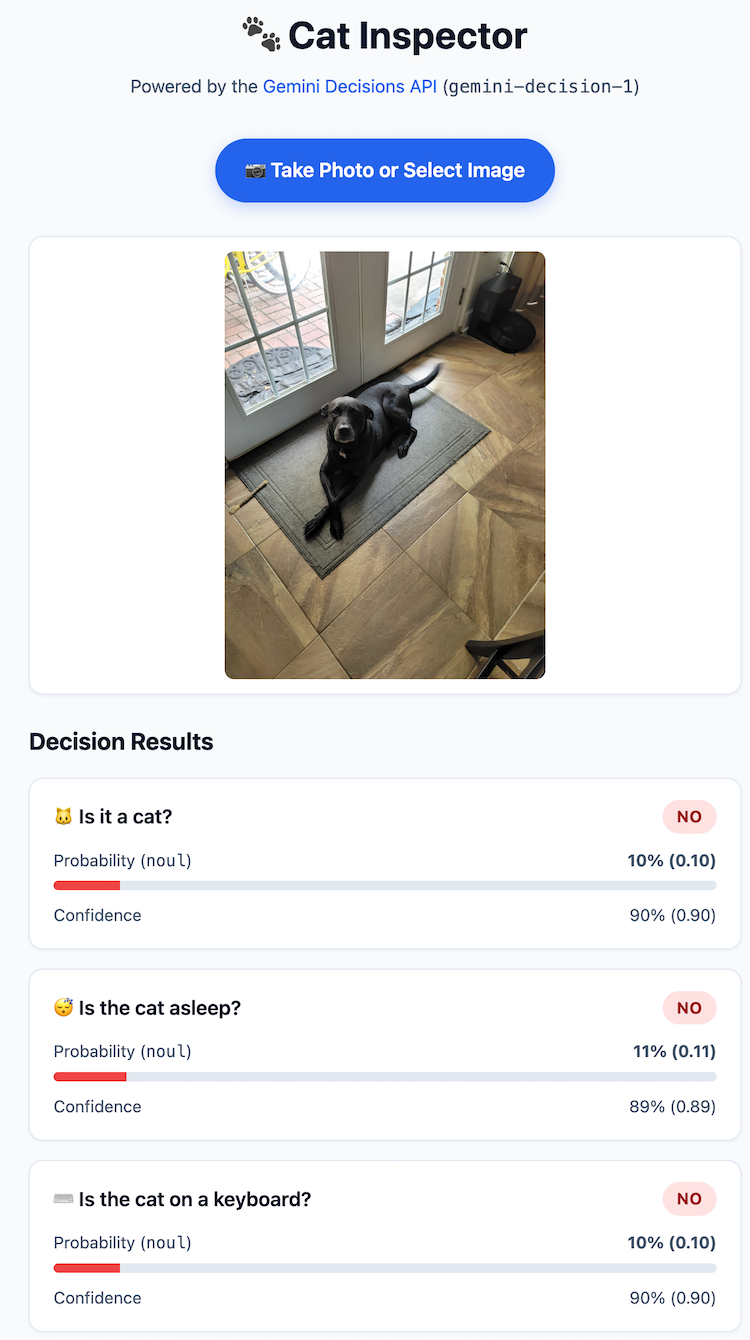
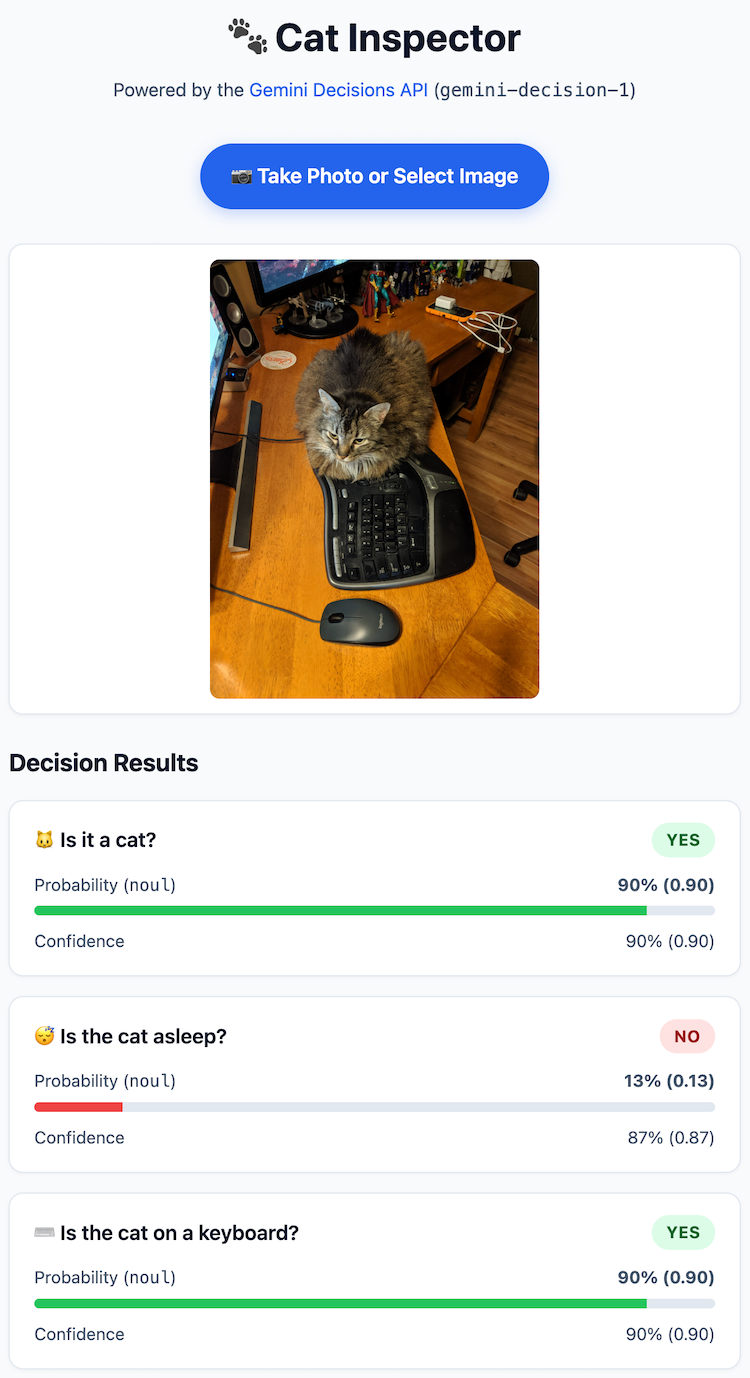
Alright, so I'm not going to host my demo live as I want to ensure I don't blow away my credits, but here's some examples:
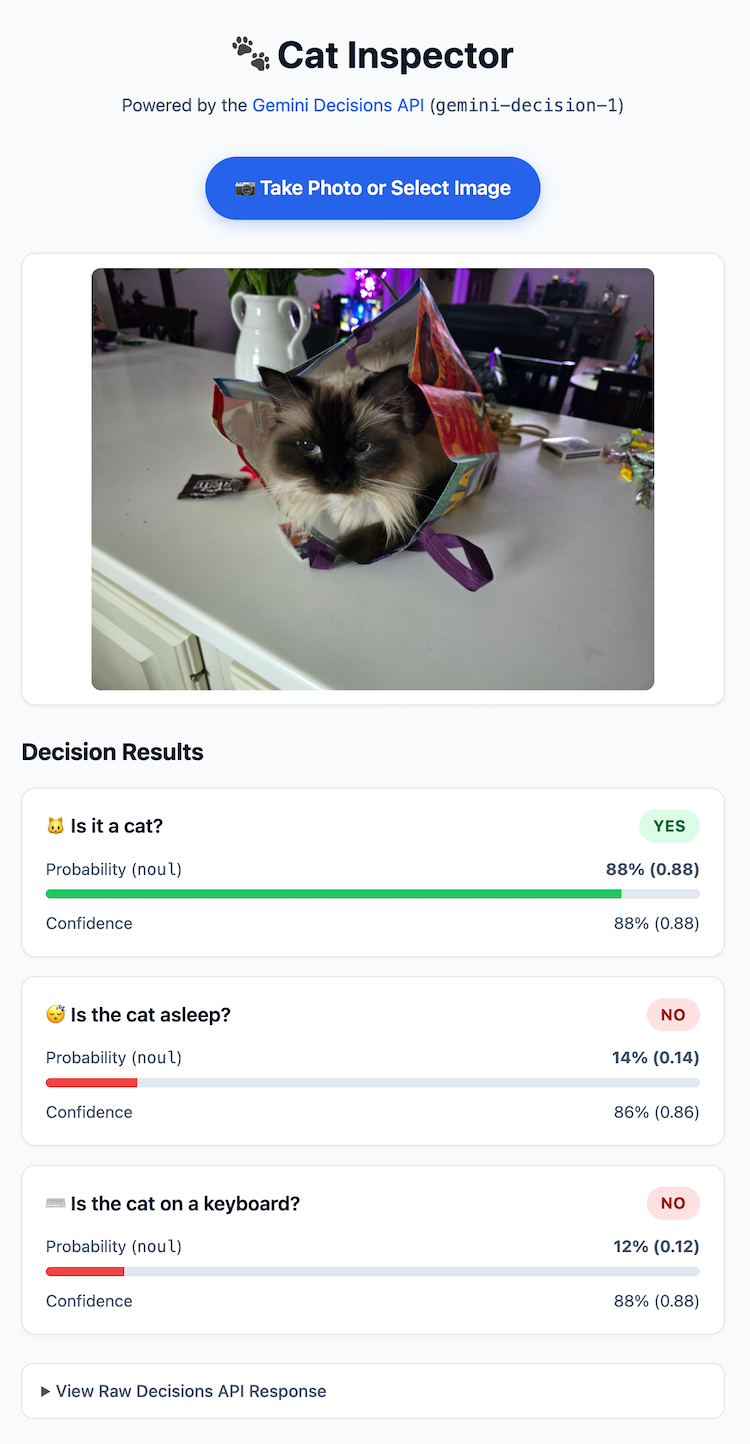
And the raw output was:
{
  "answers": {
    "on_keyboard": {
      "confidence": 0.8782465239480963,
      "noul": 0.12175347605190362,
      "type": "noul"
    },
    "is_asleep": {
      "confidence": 0.8563699701674832,
      "noul": 0.1436300298325168,
      "type": "noul"
    },
    "is_cat": {
      "confidence": 0.8833242468725534,
      "noul": 0.8833242468725534,
      "type": "noul"
    }
  },
  "usage": {
    "total_tokens": 1246,
    "total_input_tokens": 1246,
    "input_tokens_by_modality": [
      {
        "modality": "text",
        "tokens": 182
      },
      {
        "modality": "image",
        "tokens": 1064
      }
    ],
    "total_output_tokens": 0
  }
}
Make note - total output tokens is 0 - I literally paid for the input tokens and the API call itself.
Here's a good negative result:
And here's one on a keyboard:
I added some timings to my logic and roughly each test was 2 seconds or so. I saw some less than, and a few at 4, but in general, really freaking fast. Also I think it's fair to take into account the size of the images I was passing - each was near 5 megs big. I did more tests with optimized images and the speed was considerably faster - all about 1 second.
You may be curious (I was), if given the fact that questions two and three should always be false if question one is false, will the API intelligently stop processing? The answer is that it will not - and I think that's fair - the model would need to preprocess questions ahead of time in order to do that. There's a few ways you could handle this in a real app:
- Use 2 calls. The first is the general "is it a cat" with the second only being run if you get a yes with a good degree of confidence.
- Use logic in the result. Pass all 3, but if the first one is no, or not yes with enough confidence, treat the other two as false no matter what.
Let me know what you think, and if you would like to play with the demo yourself, you can grab the bits here: https://github.com/cfjedimaster/ai-testingzone/tree/main/decisions_api. Don't forget to get your own key.