TIL - Postman and OAuth

A few years back I shared two cool tips I learned about Postman ("Dynamically Creating Variables in Postman" and "Creating Visualizations in Postman"). At the time, I noted that these were both well documented features in Postman and if I had bothered to actually spend some time in the docs, I would have known about those features already. Obviously after I wrote those posts I made the time to do that. Obviously... right?
Of course not. So what follows is something that probably most of you already know, but that I was really excited to discover today so if at least one person gets excited about this as well, then my job is done.
As most folks are aware, to call an API with oAuth protection that needs to turn a client id and secret into a token, you normally hit a specific endpoint for that operation, get that token, and then use it in your next call. What I didn't know is that Postman has great built-in support to do this for you. For my needs, I'm hitting Battle.net's APIs to build something fun for my new WOW Forever character. Their getting started docs show you how to do the credential to token operation and then use the token in a protected call.
Here's how you would do the same in Postman. First, setup a new Collection (that's not required, but makes it easier). On that screen, hit the Authorization tab. On there, you'll see multiple different options, but look for OAuth 2 (assuming of course you are working with that version of OAuth):
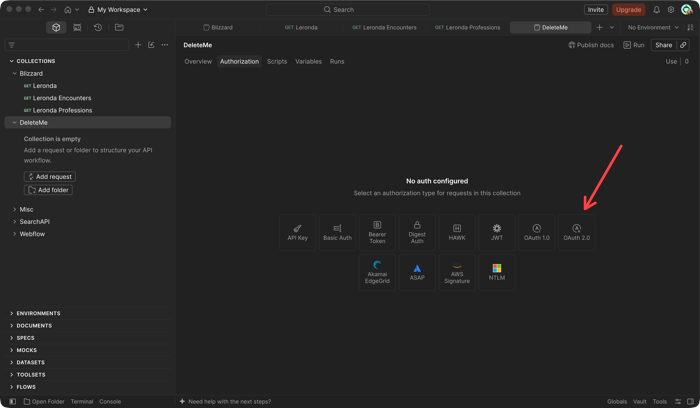
Now there's a bunch of stuff here and what you will pick will depend on the API you are using. For Battle.net, here are the particular settings I used:
- Change Grant Type to Client Credentials
- Set the access token URL to https://oauth.battle.net/token.
- Paste in the client ID and client secret values.
- Change Client Authentication to "Send as Basic Auth Header"
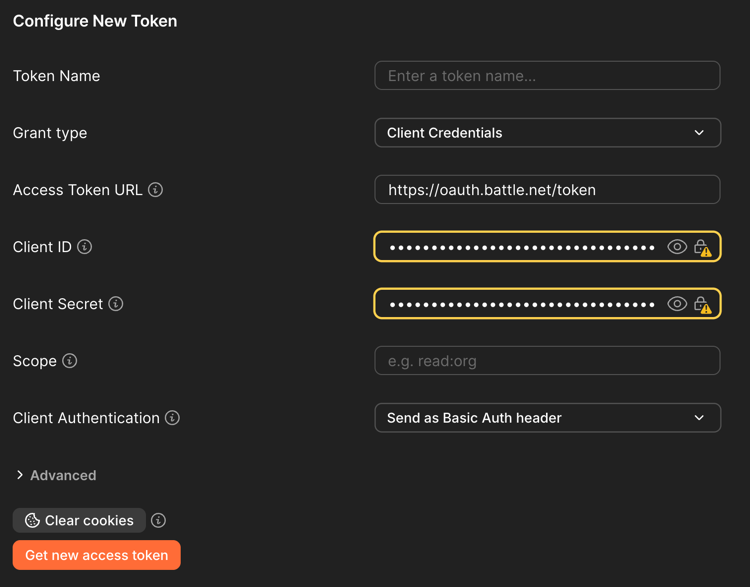
The next step is to hit that obvious "Get New Access Token" button. This will then give you a confimation dialog that auto-dismisses in 5 seconds (not even sure why it's needed) before showing you this screen:
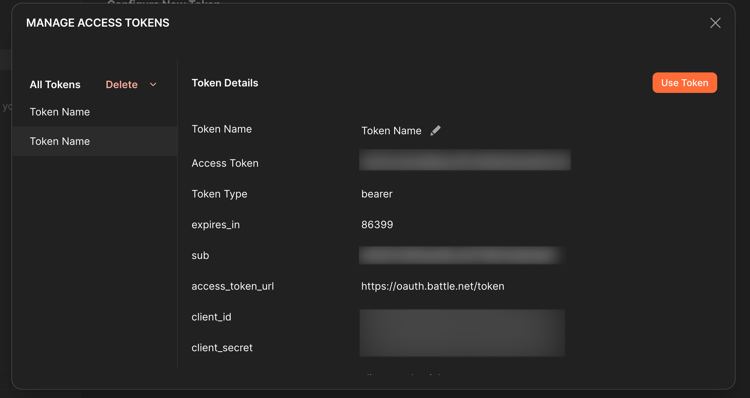
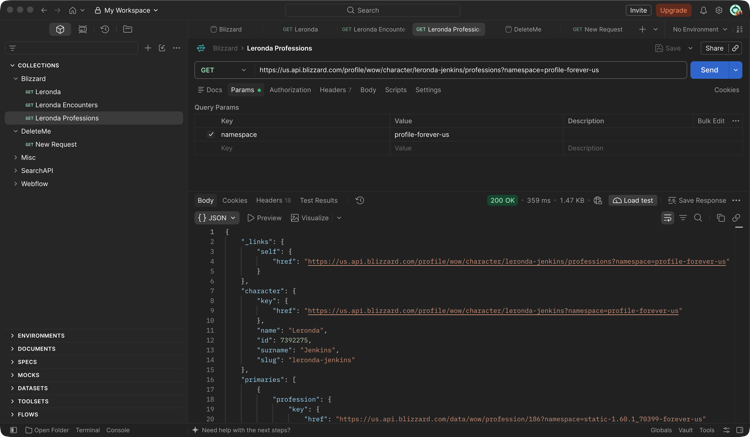
There is one last step - on this screen - click "Use Token". Now when you make a new request, the token is added automatically. And that's literally all you have to do. Here's an example calling the professions endpoint for my character:
Now, one thing to remember is that tokens are "short lived", and how short they live depends on the API. For Battle.net, it's a good 24 hours so it's not something to be worried about probably, but I was curious if there was a solution that would just "always" work, and of course there is.
If you go to your collection, select Scripts, you can write a "Before request" script. This script can do the token call and save the result as a variable that your requests can use. Here's an example:
const clientId = pm.environment.get('blizzard_client_id');
const clientSecret = pm.environment.get('blizzard_client_secret');
const token = pm.environment.get('blizzard_token');
const expires = Number(pm.environment.get('blizzard_token_expires') || 0);

// Only fetch a new token if we don't have one or it's about to expire
if (!token || Date.now() >= expires - 60000) {
  pm.sendRequest({
    url: 'https://oauth.battle.net/token',
    method: 'POST',
    header: {
      'Authorization': 'Basic ' + btoa(`${clientId}:${clientSecret}`),
      'Content-Type': 'application/x-www-form-urlencoded'
    },
    body: {
      mode: 'urlencoded',
      urlencoded: [{ key: 'grant_type', value: 'client_credentials' }]
    }
  }, (err, res) => {
    if (err || res.code !== 200) {
      console.error('Blizzard token request failed', err || res.text());
      return;
    }
    const data = res.json();
    pm.environment.set('blizzard_token', data.access_token);
    pm.environment.set('blizzard_token_expires', Date.now() + data.expires_in * 1000);
  });
}
What's cool about this script is that while it runs every request, it's smart enough to check the expires value from the first call and only do the actual token request if you need.
Ok, I promise next week I'll actually spend some time looking through the Postman docs, as obviously there's a whole heck of a lot of good stuff in there I'm missing out on. I hope this helps!