Generating PDFs from Word Templates with officeParser

I've been singing the praises of the officeParser library for a while. It's an open source JavaScript library that can parse, extract, and convert between PDFs and Office documents, as well as OpenOffice, ePub and more. My demos have all focused on client-side examples but obviously the library would work great in a server side workflow as well. I haven't worked at Adobe for years now, but I still get strangely excited working with documents. I'll just add that to the long list of reasons I'm a big nerd.
A few weeks ago, I reached out to Harsh Ankur about an idea inspired by Adobe's Document Generation API. This was probably my favorite API in their suite of PDF services. You take a Word document, put in tokens, and call the API with your data. The API would swap out the tokens with real data and give you a PDF in return. (Or Word again if you wanted that.) I suggested this to Harsh and then - voila - he added it!
At this time, the token system is simply a replacement system. You add My name is in your Word document, and if you pass { "name":"Juniper Montage"} via the library's APIs you'll get My name is Juniper Montage on the way out.
This new support is a core API, OfficeTemplate, and supports both replacing values from a regular JavaScript object or returning an array of results from a JavaScript array of objects. (Which, by the way, is something I was trying to get Adobe to add to their APIs. One of their competitors, DocuGenerate, has had this for a while.)
Here's how simple it is to use. First, create and save a Word document. Formatting doesn't matter - make it as pretty or simple as you would like. Here's an example with a few tokens:
Imagine this is stored as customerReport.docx. To turn this into a PDF, you would first import the relevant libraries (in the sample below I'm using an npm installed version, not CDN):
import { OfficeConverter, OfficeTemplate } from 'officeparser/browser-native-pdf'
Then - grab the Word document as binary data:
const response = await fetch('/assets/customerReport.docx')
const template = new Uint8Array(await response.arrayBuffer())
Get some sample data:
const data = {
  customerName: 'Northwind & Co',
  date: '2026-10-16',
  productsTotal: 7,
  reportYear: 2026,
  profit: 2500,
  losses: 125,
  recommendation: 'Continue growing. Duh',
  reporter: 'Juniper Montage',
}
Next, use the library to convert the template:
const docx = await OfficeTemplate.render(template, { data })
Finally, turn the rendered document into a PDF. The result's value is the PDF's binary
data:
const { value: pdfBytes } = await OfficeConverter.convert(docx, 'pdf', {
  generatorConfig: { pdfConfig: { engine: 'native' } },
})
At this point you can do whatever, like open it in a new tab:
const pdf = new Blob([pdfBytes], { type: 'application/pdf' })
window.open(URL.createObjectURL(pdf), '_blank')
As a note, this requires an additional package, only in the browser, pdf-lib.
A Real Demo
To show this in action, I built a simple demo that lets you fill in a form, and get the result as a PDF.
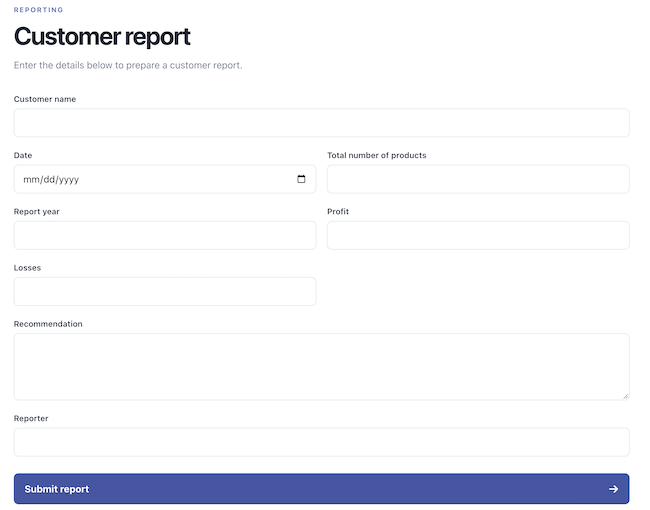
This form is tied to a bit of JavaScript that grabs the values, makes use of Intl to format dates, numbers, and currencies, and then uses officeParser to create a dynamic PDF from your values. Here's an example:
Try this yourself here: https://cfjedimaster.github.io/webdemos/officeparser/wordtemplate/dist/index.html
You can find the complete source for this here: https://github.com/cfjedimaster/webdemos/tree/master/officeparser/wordtemplate
As I mentioned above, currently the token system is relatively simple, but I've been talking with Harsh about some improvements that I bet will land pretty soon. Let me know what you think!