Building a Document Q&A System with On-Device AI

Every now and then I build a demo for a presentation and think to myself - this deserves its own blog post. I then promptly forget to actually do that. Even better, I completely forget to even show the demo in the presentation. A few weeks ago I made my first presentation at RenderATL and gave my talk on Chrome's on-device AI technology. I've been blogging about this particular set of APIs for a few years now and I've given talks on it at numerous conferences. While these APIs are still evolving, many of them (and the ones I'm using today in particular) are now fully GA for Chrome. For this demo, I put together a few things I've done before into one cohesive tool - a completely client-side application that lets you pick a file, get a summary, and then chat with it.
The Stack
The demo is built from a few different things:
- First, I'm making use of the incredibly excellent officeParser library by Harsh Ankur. This library can take any Office document, or PDF, or ODT, or CSV, and so on, and creates a parsed version you can do nearly anything with. For me, the most important feature is the ability to convert the file into Markdown which can then be used with AI.
- Next, it makes use of Chrome's Summarizer API which - you guessed it - provides summaries of textual input.
- Finally, it makes use of Chrome's Prompt API to let you ask questions about the input.
The web app itself is a simple Vite app using vanilla JavaScript. I used my AI agent to set up the application and create the design and there was quite a bit of back and forth to get things locked down, but the end result is pretty cool I think.
The App
Ok, I'm obviously going to link to it, and the source, too, but I thought I'd share a few screenshots for people who may be on Safari, or maybe reading this on iOS where Chrome is locked down to the Safari engine.
On opening the app, you get a three panel UI. The left side is for selecting and previewing the document. The upper right is for the summary. The rest of the right column is for Q and A:
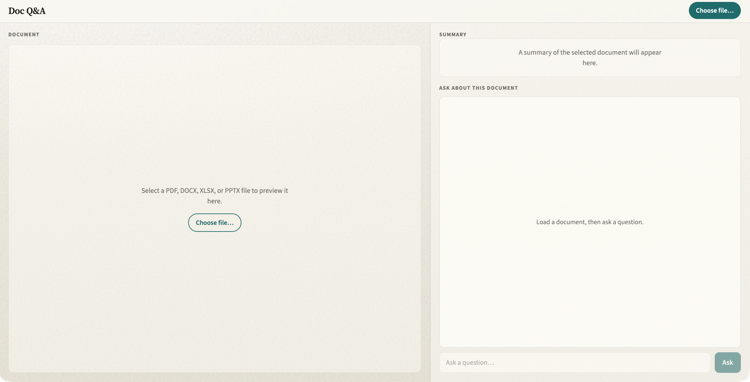
I selected my resume and after a few seconds, I get a summary. Now - I should clarify - the reason it works fast for me is that Chrome has already downloaded the roughly 4 gig model. That's absolutely not insignificant. But it's also a model shared by the browser for any web site making use of these APIs so it's not something a user has to download again and again.
Here's the summary that was displayed:
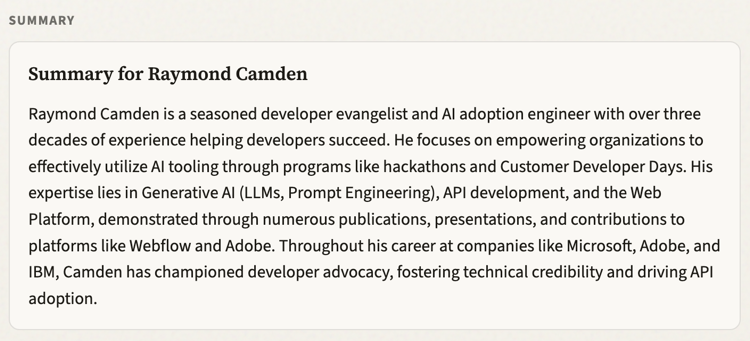
This is nearly perfect. For some reason it thinks I worked at Microsoft and as far as I know I only mention Microsoft once in the resume and it's in regard to work done at Webflow.
But that brings up a great first use of the Q and A - I specifically asked if Ray worked at Microsoft and I got the proper response:
"The provided document does not mention Ray Camden working at Microsoft."
I asked a followup question about PHP and I liked the response:
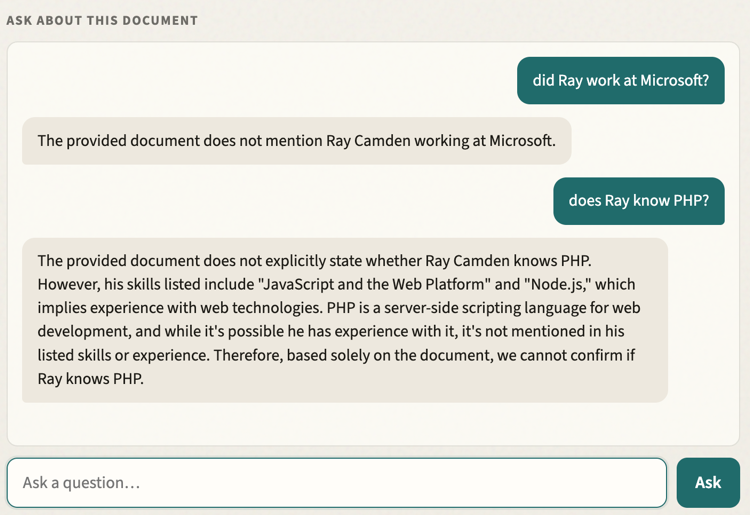
Honestly that's a pretty deep answer and kind of impressive I think.
Anyway, if you like this, and are using an up to date Chrome (on desktop or Android), you can check it out here: https://document-question-answer.netlify.app/. You can peruse the source up here: https://github.com/cfjedimaster/doc_qa