My First AI Skill for My Blog

I've been a professional writer now for thirty plus years, and honestly, it's one of the things I'm most proud about. When generative AI first exploded on the scene, a lot of people used it to help them write, and frankly, that wasn't for me. I'm not the best writer, but I damn well know how to write and damn well know my own voice. That being said, I've been really interested in how GenAI can help with the process.
I first wrote about this over two years ago: Using Generative AI as Your Content Assistant. In that post I talked about using GenAI for two very specific tasks:
- Helping with my titles
- Writing the description (which is part of the metadata for a post)
Honestly, I built those tools as proof of concept implementations and don't think I used them ever again. But lately it's been on my mind that I should think about those tools and see if there would possibly be an easier way to use GenAI to help me with my content. Specifically I'm looking for two things:
- Spelling and grammar. I've got a Visual Studio Code extension for that but it's not perfect and I also just miss it sometimes.
- And here's the big one. Sometimes I'll write about a topic and simply forget to cover something. I'd love to use my AI tool to try to find those missing aspects and let me know. Maybe I won't care. Maybe I intentionally skipped something. That being said, I'd still like to know.
You'll notice that none of the above involves AI actually writing for me. Outside of correcting spelling mistakes I made, I don't want to use my tool for that. But both of these could really help me catch things before I publish and just make the final result a little bit better.
The Skill
To build this, I made use of Claude Skills. Skills are persistent instructions that can be used across your entire environment or per project. They're written in simple Markdown and are stored in a particular folder depending on your use. I actually cheated a bit and used Claude itself to help me create the skill.
I knew about skills, knew they needed to be in a particular folder, but rather than looking it up I simply asked Claude to help me create a skill based on the needs above. It did an admirable job but I took over and tweaked things a bit.
The directory is in my repository now, at .claude/skills/prepublish. Here's what it looks like now (I say 'now' as I expect to be tweaking this over time - you can also check out the repo to see the latest!):
---
name: prepublish
description: Review a new blog post before publishing. Finds the latest post by its dated path under `src/posts/`, then spell-checks and offers content suggestions — without touching tone.
---

# Prepublish blog post review

Run this right before pushing a new post. Blog posts live in `src/posts/YYYY/MM/DD/` as `.md` files.

## Step 1 — Find the post

Do NOT use git to figure out which post is newest. Use the dated path under `src/posts/` — sort highest year → month → day and pick the most recent `.md` file.

A reliable command: `find src/posts -type f -name '*.md' | sort -r | head -5`. The first entry is the latest post; the rest are there in case there's a tie or the user wants to pick another.

If multiple `.md` files share the newest date directory, ask the user which one. Otherwise, confirm in one line ("Reviewing `path/to/post.md` — sound right?") before proceeding.

## Step 2 — Spell check

Read the post and surface misspellings. Ignore code blocks, fenced code, inline `code`, URLs, and proper nouns the user clearly intended (product names, people, libraries).

Present findings as a short list: `word → suggestion (line N)`. Don't auto-edit. Ask which corrections to apply, then apply them with Edit.

## Step 3 — Content review

Read the post end-to-end and give feedback focused on substance, not tone:

- **Things that sound stupid or unclear** — sentences that don't land, claims that need backing, awkward logic jumps.
- **Gaps worth filling** — missing context a reader would want, an example that would help, a link the user usually includes (docs, repo, related post).
- **Factual / technical accuracy** — flag anything that looks wrong or outdated. If the post references code, check it makes sense.
- **Loose ends** — TODO markers, "fill this in", broken-looking links, placeholder text.

**Do NOT** comment on tone, voice, snark level, casual phrasing, or stylistic choices. The user likes their voice; leave it alone.

Present feedback as a numbered list grouped by category. Keep each item to one or two sentences. Don't rewrite paragraphs — point at the issue and let the user decide.

## Step 4 — Apply changes

Ask which suggestions to act on. Apply only what's confirmed. Then stop — the user handles the actual publish/push.
An Example in Action
To test, I'm going to run this right now on this post, which means it may get a bit confused as the post isn't actually done, but let's just see what happens:
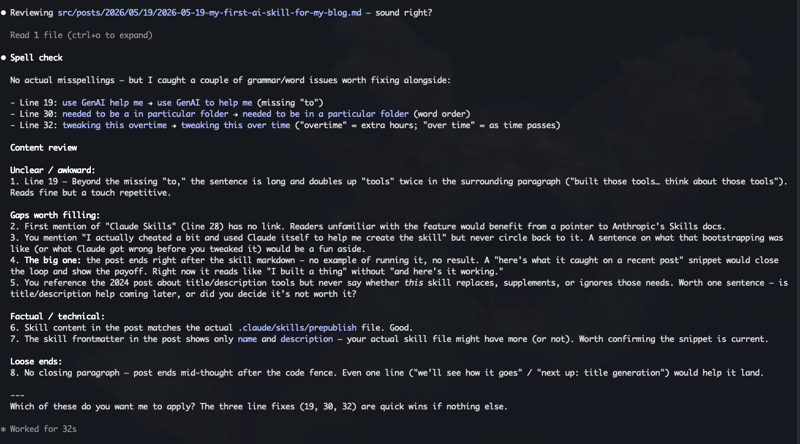
Hopefully that image is readable, let me know if not. But it did a great job of finding multiple grammar issues. My VS Code extension doesn't handle that (obviously).
I disagreed/didn't care about the awkward comment. I did care about linking to Claude Skills so I added a link. Gap 3 was incorrect. I do talk about how I 'cheated' (to be clear, it isn't cheating) in the following paragraph. And of course, issue 5 is simply because I ran this before I was done. Item 8 is the same.
You'll notice it also offered to correct those mistakes, but I did them myself and I imagine I'll do so usually.
In the end, these are all things a good editor would handle, but this is my personal blog and unfortunately I don't have an editor on call. (And even so, I'd want to do this kind of check beforehand anyway.)
What next?
Looking at the skill I wrote, and recognizing my own weaknesses (grammar, forgetting to cover things I should), I may actually move this skill into my global directory so I can use it for my non-blog writing as well. Anybody want to chime in and share if they've done something similar?
p.s. I ran the skill one more time - here's the latest: