What was that song, the one with the words?

My wife and I are both big music lovers, and I'm happy to have influenced her listening habits a bit and have loved what she's introduced me to. Given we both love music, we've also been known to sing along at times. (You can take a guess as to how well that goes.) She normally gets the lyrics right. I'm normally a bit more... loose in terms of how well I remember the lyrics. I was thinking about this and was curious how well AI could be used to identity lyrics and match them to a song, especially when the lyrics may not be exactly right. I spent some time hacking on it and here's what I built.
Strike One
I meant to type take one, accidentally wrote strike one, and as it didn't work, I'm keeping the title. ;) So my first attempt was rather simple:
- Use the SpeechRecognition API to get a transcript while you talk or sing.
- Use Chrome's Built-in AI to identify the song based on the lyrics.
Obviously Chrome's model would be date limited and wouldn't be able to pick up a recent song, but I figured I'd give that a shot first.
The SpeechRecognition API works real well, but one issue I ran into was on my mobile browser. For some reason the transcription would show up twice. I was working with Cursor to build the demo and it was able to handle that issue well.
Speaking of Cursor, it built the UI for me and honestly I think it did a great job:
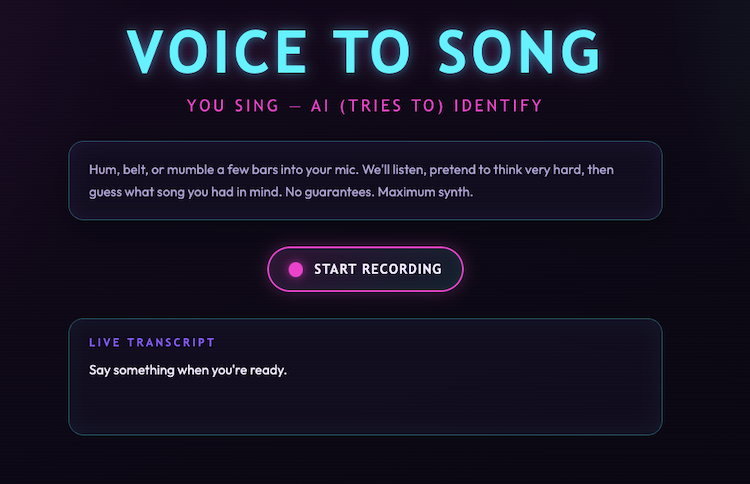
The code isn't too terribly long, so I'll share the whole thing then call out important bits:
const SpeechRecognition =
  window.SpeechRecognition || window.webkitSpeechRecognition;

const isMobileSpeech =
  /Android|iPhone|iPad|iPod/i.test(navigator.userAgent);

let recordBtn;
let transcriptEl;
let statusPanel;
let statusMessage;
let resultPanel;
let songTitleEl;
let songArtistEl;

let recognition = null;
let isRecording = false;
let finalTranscript = "";
let displayTranscript = "";

let session = null;

const schema = {
	type:"object",
	properties: {
		song: {
			type:"string",
			description:"The song name."
		},
		artist: {
			type:"string",
			description:"The artist name."
		}
	},
	required: ["song", "artist"],
	additionalProperties: false
};

async function canDoIt() {
  if (!window.LanguageModel) {
    return false;
  }

  return (await LanguageModel.availability()) !== "unavailable";
}

function showUnsupportedMessage() {
  const notice = document.createElement("p");
  notice.className = "intro";
  notice.textContent =
    "Sorry, your browser doesn't support this. This must be run on Chrome 148 or later.";
  document.querySelector(".app")?.append(notice);
}

function setRecordingUi(recording) {
  isRecording = recording;
  recordBtn.classList.toggle("is-recording", recording);
  recordBtn.setAttribute("aria-pressed", String(recording));

  const icon = recordBtn.querySelector(".record-btn__icon");
  const label = recordBtn.querySelector(".record-btn__label");

  icon.classList.toggle("record-btn__icon--mic", !recording);
  icon.classList.toggle("record-btn__icon--stop", recording);
  label.textContent = recording ? "Stop" : "Start recording";
}

function resetOutput() {
  statusPanel.hidden = true;
  resultPanel.hidden = true;
  statusMessage.textContent = "";
  songTitleEl.textContent = "";
  songArtistEl.textContent = "";
}

function transcriptFromResults(results) {
  let interimTranscript = "";
  let finalPart = "";

  for (let i = 0; i < results.length; i += 1) {
    const result = results[i];
    const text = result[0].transcript;

    if (result.isFinal) {
      finalPart += text;
    } else {
      interimTranscript += text;
    }
  }

  return {
    display: `${finalPart}${interimTranscript}`.trim(),
    final: finalPart.trim(),
  };
}

function startRecording() {
  if (!SpeechRecognition) {
    transcriptEl.textContent =
      "Speech recognition is not supported in this browser. Try Chrome.";
    return;
  }

  resetOutput();
  finalTranscript = "";
  displayTranscript = "";
  transcriptEl.textContent = "Listening...";

  recognition = new SpeechRecognition();
  recognition.lang = "en-US";
  recognition.interimResults = true;
  recognition.continuous = !isMobileSpeech;

  recognition.onresult = (event) => {
    if (isMobileSpeech) {
      const transcript = transcriptFromResults(event.results);
      displayTranscript = transcript.display;
      finalTranscript = transcript.final;
    } else {
      let interimTranscript = "";

      for (let i = event.resultIndex; i < event.results.length; i += 1) {
        const result = event.results[i];
        const text = result[0].transcript;

        if (result.isFinal) {
          finalTranscript += `${text} `;
        } else {
          interimTranscript += text;
        }
      }

      displayTranscript = `${finalTranscript}${interimTranscript}`.trim();
    }

    transcriptEl.textContent = displayTranscript || "Listening...";
  };

  recognition.onerror = (event) => {
    transcriptEl.textContent = `Recognition error: ${event.error}`;
    stopRecording();
  };

  recognition.onend = () => {
    if (isRecording && recognition.continuous) {
      recognition.start();
    }
  };

  recognition.start();
  setRecordingUi(true);
}

function stopRecording() {
  if (!recognition) {
    return;
  }

  setRecordingUi(false);
  recognition.onend = null;
  recognition.stop();
  recognition = null;

  const transcript = displayTranscript.trim() || finalTranscript.trim();
  if (transcript) {
    transcriptEl.textContent = transcript;
  }
  recognize(transcript);
}

async function recognize(transcript) {
  resetOutput();
  statusPanel.hidden = false;
  statusMessage.textContent = "Analyzing your dulcet tones...";

  if(!session) {
		session = await LanguageModel.create({
			initialInputs: [
        {
						role: 'system',
						content:
							'You are a song id bot. Given lyrics, sometimes incorrect, you try to identity the song. You only return the song and artist.'
					}
			],
			monitor(m) {
        m.addEventListener("downloadprogress", e => {
          if(e.loaded === 0 || e.loaded === 1) return;
          statusPanel.innerHTML = `Downloading, currently at ${Math.floor(e.loaded * 100)}%`;
        });
    	}
		});
	}

  console.log(`Passing: ${transcript}`);
  let thisSession = await session.clone();
  let result = await thisSession.prompt(
    [
      { role: 'user', content: transcript }
    ], { responseConstraint: schema });

  console.log(result);
  let { song, artist } = JSON.parse(result);
  songTitleEl.textContent = song;
  songArtistEl.textContent = artist;
  resultPanel.hidden = false;
}

function initApp() {
  recordBtn = document.getElementById("recordBtn");
  transcriptEl = document.getElementById("transcript");
  statusPanel = document.getElementById("statusPanel");
  statusMessage = document.getElementById("statusMessage");
  resultPanel = document.getElementById("resultPanel");
  songTitleEl = document.getElementById("songTitle");
  songArtistEl = document.getElementById("songArtist");

  document.querySelector(".controls").hidden = false;
  document.querySelector(".transcript-panel").hidden = false;

  recordBtn.addEventListener("click", () => {
    if (isRecording) {
      stopRecording();
    } else {
      startRecording();
    }
  });
}

document.addEventListener("DOMContentLoaded", async () => {
  const supported = await canDoIt();

  if (!supported) {
    showUnsupportedMessage();
    return;
  }

  initApp();
});
So up top - a bunch of variables that will point to the DOM and two checks - one for speech recognition (it should always exist, just not at the same place - scratch that - not supported in Firefox, sorry) and one for mobile.
I'm using a JSON schema to shape Chrome AI's response to ensure it just returns the song and artist.
After that - I've got code to handle clicking the record button and transcribing. As soon as you stop recording, the transcription is handed off to Chrome for analysis.
And... it worked. Poorly. If you get the lyrics right it can do ok, but it didn't really work well enough to consider it a success. You, if you are on Chrome 148 or higher, can now test this yourself, no need to flip a feature flag. It's up and running here: https://cfjedimaster.github.io/webdemos/voice_to_song/
But as I said... temper your expectations.
Version Do Re Mi
I decided to pivot and go from on-device AI to hitting the Gemini API directly. One nice thing about the Gemini APIs is that they have a proper free tier which meant I could put up a demo and not worry about the cost. (That being said, if you try the demo and it fails due to rate limits and such... I'm sorry. I'll offer you a full and complete refund at my earlier convenience.)
For this, I went back to to val.town which I've been enjoying the heck out of lately. I first did the quick hack to allow for static files by using this in main.ts:
import { staticHTTPServer } from "https://esm.town/v/std/utils/index.ts";
export default staticHTTPServer(import.meta.url);
And then added a HTTP trigger to make it accessible. (This feels like something I think val.town could make even easier.) My HTML stayed the same (except for one tweak I'll mention below) and my JavaScript changed to remove the check for Chrome's AI and just do a simple fetch call:
let req = await fetch(API, {
method: "post",
body: JSON.stringify({ transcript }),
});

let result = await req.json();
This is calling api.ts which also has a HTTP trigger:
import { GoogleGenerativeAI } from "npm:@google/generative-ai";

const schema = {
  type: "object",
  properties: {
    song: {
      type: "string",
      description: "The song name.",
    },
    artist: {
      type: "string",
      description: "The artist name.",
    },
  },
  required: ["song", "artist"],
};

const genAI = new GoogleGenerativeAI(Deno.env.get("GEMINI_API_KEY"));
const model = genAI.getGenerativeModel({
  model: "gemini-flash-latest",
});

export default async function (req: Request): Promise<Response> {
  const body = await req.json();
  console.log("req", body);

  let result = await model.generateContent(
    {
      contents: [{
        role: "user",
        parts: [{
          text:
            `Identify this song based on lyrics remembered. You will be passed lyrics that the user guesses are in the song. Lyrics could be wrong. Search against the lyrics, not the title of the song. Here's what they remember: ${body.transcript}`,
        }],
      }],
      generationConfig: {
        responseMimeType: "application/json",
        responseSchema: schema,
      },
    },
  );

  console.log(result.response.text());

  return Response.json(JSON.parse(result.response.text()));
}
You'll note I improved the system message a bit here. While testing with a buddy, he noted it seemed to sometimes focus on matching a title in the transcript, so I wanted to try to avoid that.
Back in the HTML, I made one more important change to the instructions:
Sing (or say) a few bars into your mic. We'll listen, pretend to think
very hard, then guess what song you had in mind. No guarantees. Maximum
synth.
I removed the mention of humming as that won't actually be transcribed. In theory, we could record that audio and send it to Gemini as well, but I was trying to keep this simpler.
Want to try this version? Want to belt out some tunes? Head over to the live version here: https://raymondcamden--4d1152f64d8111f1a0fbee650bb23af1.web.val.run/
As I said, this is a free tier Gemini call so I fully expect you may hit limits. You can always fork my val (embedded below) and use your own key.
Here's an example:
How well does this one work? Better! But myself, and my friends who tested, still see mistakes. That being said, it was kind of fun. Let me know what you find!
Also, a big thank you (again!) to Thomas Steiner from the Chrome team for help while I was building this out!
I was going to embed the Val here, but apparently you can only embed one file so - instead, here's a simple link instead: https://www.val.town/x/raymondcamden/voice-to-song
Photo by Mayko Sousa on Unsplash