Finding Your Most Popular Bluesky Followers
A long time, like, a really long time ago, I created a web app that would take your Twitter followers and then sort them by the number of followers they had. This was, of course, next to useless but was a fun excursion into the Twitter API and kinda cool to see "big names" following me. We all know what happened to the Twitter API, and Twitter itself, but last night I decided to take a stab at building something similar for Bluesky. If you don't care about the how and just want to see the result, you can play with it here: https://happy-mountain-lamb.codepen.app/
Still here? Ok, let's talk turkeycode!
The Bluesky API
I've built a number of demos already using Bluesky's APIs, and for the most part, they're easy to use and "just work" - which is all you want from an API. That was my expectation going into this little demo, but what I was really surprised by was the fact that everything I needed to do could be done without any authentication at all. I didn't need oAuth, I didn't need an API key, I just hit public endpoints and everything just worked.
My demo makes use of a few different endpoints:
app.bsky.actor.getProfile is used to return information about the user you are generating a report on. As an example, this is what it returns for me:
{
    "did": "did:plc:4tan3ugu55i2u3hmtblu7wf5",
    "handle": "raymondcamden.com",
    "displayName": "Raymond Camden",
    "avatar": "https://cdn.bsky.app/img/avatar/plain/did:plc:4tan3ugu55i2u3hmtblu7wf5/bafkreiepx6pemul5jmnbmplgt5nfv43qaaab3admth4hlgt7foondje46m",
    "associated": {
        "lists": 0,
        "feedgens": 0,
        "starterPacks": 0,
        "labeler": false,
        "chat": {
            "allowIncoming": "all"
        },
        "activitySubscription": {
            "allowSubscriptions": "followers"
        }
    },
    "labels": [],
    "createdAt": "2023-04-27T14:26:21.272Z",
    "description": "Developer Advocate who spends all his time building demos involving cats. ",
    "indexedAt": "2024-01-20T05:45:01.638Z",
    "banner": "https://cdn.bsky.app/img/banner/plain/did:plc:4tan3ugu55i2u3hmtblu7wf5/bafkreidia27zaotxjebruhsjfkrkwaho4jxzkm6gipkx62ggtnerdmvvfq",
    "followersCount": 2145,
    "followsCount": 476,
    "postsCount": 1379
}
app.bsky.graph.getFollowers - the getFollowers endpoint returns a paginated list of an account's followers. This returns basic information about the account, but not how many followers the account has.
app.bsky.actor.getProfiles - this endpoint is like the first, returning detailed information about a profile, but it lets you pass in 25 accounts at once. I use this to 'enhance' the results from getFollowers and add their follower count.
Now let's look at how I put this together.
The App
The application is just vanilla HTML, JavaScript, and CSS. The HTML is pretty simple as JavaScript is handling most of the content output:
<!DOCTYPE html>
<html lang="en">
  <head>
    <meta charset="UTF-8">
    <link rel="stylesheet" href="./style.css">
    <meta name="viewport" content="width=device-width, initial-scale=1.0">
    <title>Popular Followers</title>
		<link rel="stylesheet" href="https://cdn.simplecss.org/simple.min.css">
  </head>
  <body>

		<p>
		<label for="username">
			Enter the username to check:
			<input type="search" id="username" value="">
		</label>
		</p>
		<button id="executeUser">Execute!</button>
		<span id="status"></span>

		<div id="userProfile"></div>
		<!-- this should be CSS I believe... -->
		<br clear="left">
		<div id="report"></div>
    <script src="./script.js"></script>
  </body>
</html>
On the JavaScript side, I begin with a bunch of DOM grabbing and I listen for click events on my button:
document.addEventListener('DOMContentLoaded', init, false);

let $username, $executeUser, $status, $userProfile, $report;

async function init() {
	$username = document.querySelector('#username');
	$executeUser = document.querySelector('#executeUser');
	$status = document.querySelector('#status');
	$userProfile = document.querySelector('#userProfile');
	$report = document.querySelector('#report');
	$executeUser.addEventListener('click', executeUser);
}
Yes, executeUser is a horrible name for a function. I'm ok with that. That function is pretty intense, so let's check it out:
async function executeUser() {
	let nick = $username.value.trim();
	if(nick === '') return;
	console.log(`going to do ${nick}`);
	$status.innerHTML = `Looking up ${nick}...`;
	$executeUser.setAttribute('disabled','disabled');

	let user = await getUser(nick);
	if(user.error) {
		$status.innerHTML = `Unable to load this user: ${user.message}`;
			$executeUser.removeAttribute('disabled');
			return;
	}
	console.log(user);

	// yes it is only blank for a sec, but...
	$status.innerHTML = '';
	$userProfile.innerHTML = `
	<p>
	<img src="${user.avatar}">
	The user, ${nick} has the display name: ${user.displayName}. They are followed by ${numberFormat(user.followersCount)} users. Generating top follower count now.
	</p>
	`;

	$status.innerHTML = 'Loading followers (this may take a while)';

	let followers = [];
	let fList = await getFollowers(nick);
	console.log(fList);

	$status.innerHTML = 'Now loading info on these users.';

	fList = await inflateUsers(fList);

	fList.sort((a,b) => {
		return b.followersCount - a.followersCount;
	});
	console.table(fList);

	$status.innerHTML = '';
	let report = `
	<h3>Report (Top 100)</h3>
	<table>
		<thead>
		<tr>
			<th>Avatar</th><th>Name</th><th>Followers</th>
		</tr>
		</thead>
		<tbody>
	`;

	fList.slice(0,100).forEach(f => {
		report += `
<tr>
	<td><img src="${f.avatar}" class="reportAvatar"></td>
	<td><a href="https://bsky.app/profile/${f.handle}" target="_blank">${f.handle}${f.displayName?' (' + f.displayName + ')':''}</a></td>
	<td>${numberFormat(f.followersCount)}</td>
</tr>
		`;
	});

	report += '</tbody></table>';
	$report.innerHTML = report;
	$executeUser.removeAttribute('disabled');

}
This is the primary portion of the application. It handles validating your input and ensuring you entered a real user account. After rendering a little bit about the account, it kicks off the process to get your followers and then enhance those results so we know the follower count.
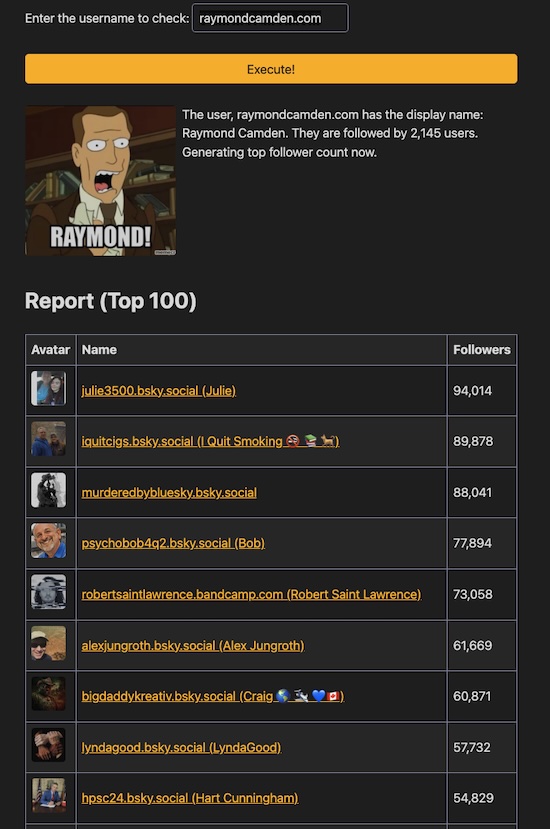
The final step is to sort and render it out in a basic table. I filter to the top 100 but dump the entire result in your console if you want to see. (If you didn't know about console.table, it is hella useful for cases like this.)
My three Bluesky API wrappers are pretty trivial outside of intelligently handling both pagination and sending 25 users at a time in slices:
async function getUser(u) {
	let uReq = await fetch(`https://api.bsky.app/xrpc/app.bsky.actor.getProfile?actor=${u}`);
	return await uReq.json();
}

/*
I grab all the followers, looping over each page
*/
async function getFollowers(u) {
	let result = [];
	let hasMore = true;
	let cursor = '';

	while(hasMore) {
		console.log(`loading for cursor ${cursor}`);
		let fReq = await fetch(`https://api.bsky.app/xrpc/app.bsky.graph.getFollowers?actor=${u}&cursor=${cursor}&limit=100`);
		let thisResult = await fReq.json();
		result.push(...thisResult.followers);
		if(!thisResult.cursor) hasMore = false;
		else cursor = thisResult.cursor;
		// tempf for testing
		//if(result.length >= 200) hasMore = false;
	}
	return result;
}

/*
Given an array of users, I need to get more info about them, specifically just how many followers they have.
BSky supports getting 25 at a time, so we will use that
to lower the # of network calls
*/
async function inflateUsers(users) {
	for(let i=0; i<users.length;i+=25) {
		let slice = users.slice(i,i+25);
		let uList = slice.reduce((list, u) => {
			list.push(`&actors=${u.handle}`);
			return list;
		},[]);

		let uReq = await fetch(`https://api.bsky.app/xrpc/app.bsky.actor.getProfiles?${uList.join('')}`);
		let uData = await uReq.json();
		console.log('uData!!!', uData);
		for(let x=0;x<uData.profiles.length;x++) {
			users[i+x].followersCount = uData.profiles[x].followersCount;
		}
		console.log(`slice starting at ${i} has len ${slice.length}`);
	}
	return users;
}
If you don't want to test this yourself, here's a screen shot of it in action.
Finally, this was maybe my second or third time using the new CodePen. You can check it out in the embed below. I'm really digging it, especially the new editing experience. I much prefer having tabs so I can focus on one file at a time. Sure, you could minimize the panels in CodePen before, but this UX just feels closer to Visual Studio Code and is just more enjoyable to me.
Also, as I said in the beginning, this is kind of a pointless tool and mostly exists to stroke your ego a bit, but I can see some usefulness in reporting on your followers. Not for a personal account like my own, but for brand or larger media accounts perhaps. It wouldn't be difficult to add different types of sorting or filtering for example. If you end up forking my code, let me know!
See the Pen Top BS Followers by Raymond Camden (@cfjedimaster) on CodePen.