Building My Own Social Network Poster in Astro

Today is a big day for Astro, not only do you get Astro v6 (it just released a few hours ago!), you also get one of my demos! Ok, one of these is more important than the other, but, I'm really excited about v6 and hope to have a demo of the new features to share soon. With that being said, I'm also sharing a demo I started work on a few weeks ago and finally wrapped up this past weekend - Social Beast.
What is Social Beast
Social Beast is a web app meant to be run locally (although I have some thoughts on that restriction and will share at the end) that handles posting to multiple social networks at once. Right now "multiple" is two:
- Mastodon
- Bluesky
It doesn't support Twitter because Twitter is a dumpster, on fire, inside another burning dumpster. It was initially going to support Threads as well, but as I wanted to skip oAuth (more on that too), I decided against it.
And that's it - literally. It doesn't show you latest posts and stats, it's just meant to give me a quick way to post to both networks at once. There are tools for this of course, many of which cost money. There's also openvibe, which has a good mobile app, but I wasn't happy with the web/desktop experience.
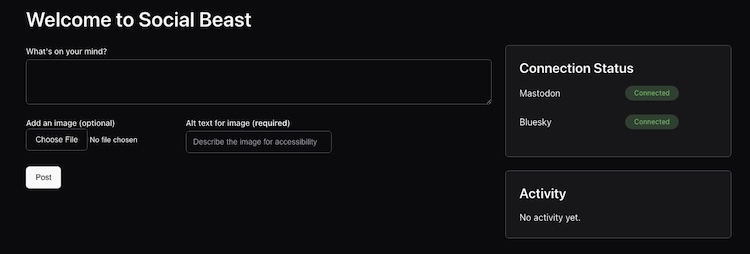
After setting up your authentication, you run the app, open it in your browser, and you're ready to go:
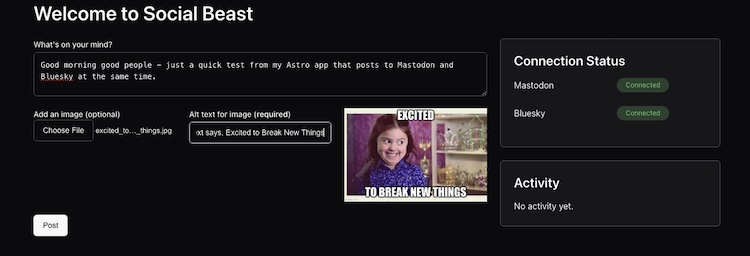
You simply enter your text, optionally include an image (with required alt text), and then hit post:
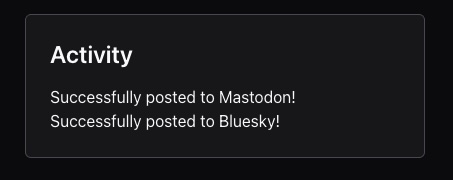
The little activity window on the right updates when done:
You can see the result below. I haven't used the default embedding experience for Bluesky and Mastodon in a while, so here goes nothing:
Bluesky
Good morning good people - just a quick test from my Astro app that posts to Mastodon and Bluesky at the same time.
— Raymond Camden (@raymondcamden.com) March 10, 2026 at 9:06 AM
[image or embed]
Mastodon
Show Me The Code!
Ok, as always, you can find this demo (and others) up on my astro-tests repo. Here is the link to this one: https://github.com/cfjedimaster/astro-tests/tree/main/social-beast
The application is a single page with a few routes for API calls. I made use of Oat for the design. Here's the main HTML page, containing the form and two panels on the right:
---
import BaseLayout from '../layouts/BaseLayout.astro';
---

<BaseLayout pageTitle="Social Beast">
	<h1>Welcome to Social Beast</h1>

	<div class="row">
		<div class="col-8">

			<p>
			<label for="postContent">What's on your mind?</label>
			<textarea id="postContent"></textarea>
			</p>

			<div class="row">
				<div class="col-4">
					<label for="postImage">Add an image (optional)</label>
					<input type="file" id="postImage" accept="image/*">
				</div>
				<div class="col-4">
					<label for="altText">Alt text for image (<strong>required</strong>)</label>
					<input type="text" id="altText" placeholder="Describe the image for accessibility">
				</div>
				<div class="col-4">
					<img id="imagePreview" src="" alt="Image preview" style="max-width: 100%; display: none;">
				</div>
			</div>

			<p>
			<button id="postButton" class="mt-6">Post</button>
			</p>
		</div>
		<div class="col-4">

			<article class="card">
			<header>
				<h3>Connection Status</h3>
			</header>
			<div class="row mb-6 items-center">
				<div class="col-6">
					Mastodon
				</div>
				<div class="col-6">
					<span class="badge secondary" id="mastodonStatus">Unknown</span>
				</div>
			</div>
			<div class="row mb-6 items-center">
				<div class="col-6">
					Bluesky
				</div>
				<div class="col-6">
					<span class="badge secondary" id="blueskyStatus">Unknown</span>
				</div>
			</div>
			</article>

			<article class="card mt-6">
			<header>
				<h3>Activity</h3>
				<div id="activityFeed">
					<p>No activity yet.</p>
			</header>
			</article>
		</div>
	</div>
</BaseLayout>
Most of the work is done in JavaScript. Let's break that down.
First, on document load I'm creating a bunch of variables for DOM manipulation and such, and I fire off a few status checks:
let $mastodonStatus;
let $blueskyStatus;
let $postButton, $postContent, $postImage, $altText, $imagePreview;
let $activityFeed;

let MASTODON = false;
let BLUESKY = false;

document.addEventListener('DOMContentLoaded', function() {

    $mastodonStatus = document.querySelector('#mastodonStatus');
    $blueskyStatus = document.querySelector('#blueskyStatus');
    $postButton = document.querySelector('#postButton');
    $postContent = document.querySelector('#postContent');
    $postImage = document.querySelector('#postImage');
    $altText = document.querySelector('#altText');
    $imagePreview = document.querySelector('#imagePreview');
    $activityFeed = document.querySelector('#activityFeed');

    // Begin by checking the status of the 2 networks
    checkMastodonStatus();
    checkBlueskyStatus();

    $postButton.addEventListener('click', handlePost);
    $postImage.addEventListener('change', doPreview);

});
Note the two status methods. These two functions honestly could have been one, but here they are:
async function checkMastodonStatus() {
    try {
        const response = await fetch('/api/mastodon/check.json');
        const data = await response.json();
        if (data.ready) {
            $mastodonStatus.textContent = 'Connected';
            $mastodonStatus.classList.remove('secondary');
            $mastodonStatus.classList.add('success');
            MASTODON = true;
        } else {
            $mastodonStatus.textContent = 'Not Connected';
            $mastodonStatus.classList.remove('secondary');
            $mastodonStatus.classList.add('danger');
            $mastodonStatus.title = data.error || 'Unknown error';
            console.error(data.error);
        }
    } catch (error) {
        console.error('Error checking Mastodon status:', error);
        $mastodonStatus.textContent = 'Error';
        $mastodonStatus.classList.remove('secondary');
        $mastodonStatus.classList.add('danger');
    }
}

async function checkBlueskyStatus() {
    try {
        const response = await fetch('/api/bluesky/check.json');
        const data = await response.json();
        if (data.ready) {
            $blueskyStatus.textContent = 'Connected';
            $blueskyStatus.classList.remove('secondary');
            $blueskyStatus.classList.add('success');
            BLUESKY = true;
        } else {
            $blueskyStatus.textContent = 'Not Connected';
            $blueskyStatus.classList.remove('secondary');
            $blueskyStatus.classList.add('danger');
            $blueskyStatus.title = data.error || 'Unknown error';
            console.error(data.error);
        }
    } catch (error) {
        console.error('Error checking Bluesky status:', error);
        $blueskyStatus.textContent = 'Error';
        $blueskyStatus.classList.remove('secondary');
        $blueskyStatus.classList.add('danger');
    }
}
Both call an endpoint and based on the result, update the UI. You can run the app with only one network available.
Now, let's leave the front end and demonstrate how the status checks are done. Both Mastodon and Bluesky support are provided via environment variables. Here's my .env file as an example:
MASTODON_TOKEN=mytokenbringsalltheboystotheyard
MASTODON_SERVER=https://mastodon.social

BLUESKY_USERNAME=raymondcamden.com
BLUESKY_PASSWORD=damnrightitsbetterthanyours
Each of my social networks is stored in the api folder of my app. Mastdon's status route looks like so:
export const prerender = false;

const MASTODON_TOKEN = process.env.MASTODON_TOKEN;
const MASTODON_SERVER = process.env.MASTODON_SERVER;

export async function GET({ params, request }) {

  let response = {
    ready: false
  }

  // check for env values
  if(!MASTODON_TOKEN || !MASTODON_SERVER) {
    response.error = 'Missing env values for MASTODON_TOKEN or MASTODON_SERVER';
  } else {
    // try to fetch account info using the token and server
    await fetch(`${MASTODON_SERVER}/api/v1/accounts/verify_credentials`, {
      headers: {
        'Authorization': `Bearer ${MASTODON_TOKEN}`
      }
    })
    .then(res => {
      if(res.ok) {
        response.ready = true;
      } else {
        response.error = `Mastodon API error: ${res.status} ${res.statusText}`;
      }
    })
    .catch(error => {
      response.error = `Error connecting to Mastodon API: ${error.message}`;
    })
  }

  return new Response(
    JSON.stringify(response),
  );

}
Mastodon has a handy verify_credentials API so I simply use that to see if the provided auth is correct.
For Bluesky, I did it a bit differently. You exchange your auth for an auth token, so I built it out in two files. First, login.js:
export async function loginToBluesky() {

    const BLUESKY_USERNAME = process.env.BLUESKY_USERNAME;
    const BLUESKY_PASSWORD = process.env.BLUESKY_PASSWORD;

    if(!BLUESKY_USERNAME || !BLUESKY_PASSWORD) {
        console.error('Missing env values for BLUESKY_USERNAME or BLUESKY_PASSWORD');
        return null;
    }

    let body = {
        identifier: BLUESKY_USERNAME,
        password: BLUESKY_PASSWORD
    };

    try {
        let response = await fetch('https://bsky.social/xrpc/com.atproto.server.createSession', {
            method: 'POST',
            headers: {
                'Content-Type': 'application/json'
            },
            body: JSON.stringify(body)
        });

        if(response.ok) {
            let data = await response.json();
            //console.log('Bluesky session data:', data);
            return { auth: data };
        } else {
            console.error(`Bluesky API error: ${response.status} ${response.statusText}`);
            return { error : `Bluesky API error: ${response.status} ${response.statusText}` };
        }
    } catch (error) {
        console.error(`Error connecting to Bluesky API: ${error.message}`);
        return { error: `Error connecting to Bluesky API: ${error.message}` };
    }
}
Which makes check.json.js pretty short:
import { loginToBluesky } from "./logon";

export const prerender = false;

export async function GET({ params, request }) {

  let response = {
    ready: false
  }

  let authCheck = await loginToBluesky();
  if(authCheck && authCheck.auth) {
    response.ready = true;
  } else if(authCheck && authCheck.error) {
    response.error = authCheck.error;
  }

  return new Response(
    JSON.stringify(response),
  );

}
Alright, so back to the front end, the post logic begins with a bit of validation, and then passing off the calls to helper methods:
async function handlePost() {
    let post = {};

    // First, a sanity check
    if(!MASTODON && !BLUESKY && !THREADS) {
        ot.toast('No social networks are configured! Please set up at least one network to post.', 'Action Stopped', {
            variant: 'danger',
            duration: 6000
        });

        return;
    }

    const content = $postContent.value.trim();
    if(!content) {
        ot.toast('No content. Type something!', 'Action Stopped', {
            variant: 'danger',
            duration: 3000
        });

        return;
    }

    post.content = content;

    let caption = $altText.value.trim();
    if($postImage.files.length > 0) {
        if(!caption) {
            ot.toast('Image requires alt text. Please add alt text for the image and try again.', 'Action Stopped', {
                variant: 'danger',
                duration: 3000
            });
            return;
        }

        post.image = await fileToBase64($postImage.files[0]);
        post.altText = caption;
    }

    $postButton.setAttribute('disabled', 'disabled');
    // Call all 3 networks, and wait for the results
    $activityFeed.innerHTML = 'Posting to enabled networks...';

    let results = [];

    if(MASTODON) {
        results.push(postToMastodon(post));
    }

    if(BLUESKY) {
        results.push(postToBluesky(post));
    }

    let settledResults = await Promise.allSettled(results);
    console.log('Settled results:', settledResults);
    let resultHTML = '';
    for(let result of settledResults) {
        if(result.status === 'fulfilled') {
            let data = result.value;
            if(data.ok) {
                resultHTML += `Successfully posted to ${data.network}!<br>`;
            } else {
                resultHTML += `Failed to post to ${data.network}: ${data.error}<br>`;
            }
        } else {
            resultHTML += `Error posting to a network: ${result.reason}<br>`;
        }
    }

    $activityFeed.innerHTML = resultHTML;

    // cleanup
    $postContent.value = '';
    $postImage.value = '';
    $altText.value = '';
    $imagePreview.src = '';
    $imagePreview.style.display = 'none';
    $postButton.removeAttribute('disabled');
}
I'll skip showing you postToMastodon and postToBluesky as they simply call API routes on the back end and gather the results. Mastodon posting is pretty simple:
export const prerender = false;

const MASTODON_TOKEN = process.env.MASTODON_TOKEN;
const MASTODON_SERVER = process.env.MASTODON_SERVER;

export async function POST({ params, request }) {

    const body = await request.json();

    let response = {
        ok: false
    }

    // check for env values (this shouldn't ever run as check returns false, but just in case
    if(!MASTODON_TOKEN || !MASTODON_SERVER) {
        response.error = 'Missing env values for MASTODON_TOKEN or MASTODON_SERVER';
    } else if(!body.post.content) {
        response.error = 'Missing content in request body';
    } else {

        let postData = new FormData();
        postData.append('status', body.post.content);

        // check for image
        if(body.post.image) {
            let mediaPost = new FormData();
            mediaPost.append('file', body.post.image);
            mediaPost.append('description', body.post.altText || '');

            let mediaResponse = await fetch(`${MASTODON_SERVER}/api/v2/media`, {
                method: 'POST',
                headers: {
                    'Authorization': `Bearer ${MASTODON_TOKEN}`
                },
                body: mediaPost
            });

            let mediaResult = await mediaResponse.json();

            postData.append('media_ids[]', mediaResult.id);
        }


        await fetch(`${MASTODON_SERVER}/api/v1/statuses`, {
            method: 'POST',
            body: postData,
            headers: {
                'Authorization': `Bearer ${MASTODON_TOKEN}`
            }
        })
        .then(res => {
            if(res.ok) {
                response.ok = true;
            } else {
                response.error = `Mastodon API error: ${res.status} ${res.statusText}`;
            }
        })
        .catch(error => {
            response.error = `Error connecting to Mastodon API: ${error.message}`;
        })
    }

    return new Response(
        JSON.stringify(response),
    );

}
And here's Bluesky:
export const prerender = false;

import { loginToBluesky } from "./logon";

const BLUESKY_USERNAME = process.env.BLUESKY_USERNAME;

export async function POST({ params, request }) {

    const body = await request.json();

    let response = {
        ok: false
    }

    let authCheck = await loginToBluesky();
    if(authCheck && authCheck.error) {
        response.error = authCheck.error;

    } else {

        let postBody = {
            repo:BLUESKY_USERNAME,
            collection:"app.bsky.feed.post",
            record: {
                text:body.post.content,
                createdAt: new Date().toISOString()

            }
        };

        // check for image
        if(body.post.image) {

            body.post.image = body.post.image.replace(/^data:image\/\w+;base64,/, "");
            let imageBuffer = Buffer.from(body.post.image, 'base64');

            let mediaResponse = await fetch('https://bsky.social/xrpc/com.atproto.repo.uploadBlob', {
                method: 'POST',
                headers: {
                    'Authorization': `Bearer ${authCheck.auth.accessJwt}`,
                    'Content-Type': 'image/jpeg'
                },
                body: imageBuffer
            });

            let mediaResult = await mediaResponse.json();
            //console.log('Media upload result:', mediaResult);

            // modify postBody to include image
            postBody.record.embed = {
                "$type": "app.bsky.embed.images",
                images: [
                {
                    alt:body.post.altText || '',
                    image: mediaResult.blob
                }
                ]
            }

        }

        await fetch('https://bsky.social/xrpc/com.atproto.repo.createRecord', {
            method: 'POST',
            headers: {
                'Content-Type': 'application/json',
                'Authorization': `Bearer ${authCheck.auth.accessJwt}`
             },
            body: JSON.stringify(postBody)
        })
        .then(res => {
            if(res.ok) {
                response.ok = true;
            } else {
                response.error = `Bluesky API error: ${res.status} ${res.statusText}`;
            }
        })
        .catch(error => {
            response.error = `Error connecting to Bluesky API: ${error.message}`;
        })

    }

    return new Response(
        JSON.stringify(response),
    );

}
Note that each post to Bluesky runs the login method and I could cache the auth token returned, but I figured even a person posting a lot won't necessarily get a lot of benefit from that. That being said - there's room for improvement...
What Else?
Ok, so, this is pretty simple, as I wanted it to be, but there's a few things I'd consider good changes.
I mentioned that the idea here was to run this locally with hard coded auth in your environment. I could prompt the user to paste in the values and cache it in LocalStorage, but that felt iffy to me.
I also mentioned I skipped Threads as I didn't want to do oAuth. You can absolutely do oAuth in Astro, even I've done it, and I'd be willing to take in a PR from someone who wants to add that, but it didn't feel worth the effort to me.
Finally, a shoutout to Bob Monsour for the inspiration. You can find his version of this idea (which does a lot more), here: https://github.com/bobmonsour/social-posting
Photo by Sean Foster on Unsplash