Interrogate Your PDFs with Chrome AI

Yesterday I blogged about using PDF.js and Chrome's on-device AI to create summaries of PDF documents, all within the browser, for free. In that post I mentioned it would be possible to build a Q and A system so users could ask questions about the document, and like a dog with a bone, I couldn't let it go. Last I built not one, but two demos of this. Check it out.
Version One
Before I begin, note that this version makes use of the Prompt API, which is still behind a flag in Chrome. For this demo to work for you, you would need the latest Chrome and the right flags enabled. The Prompt API is available in extensions without the flag and it wouldn't surprise me if this requirement is removed in the next few months. Than again, I don't speak for Google so take that with a Greenland-sized grain of salt.
If you remember, I shared the code yesterday that parsed a PDF and grabbed the text, so today I'll focus on the changes to allow for questions.
First, the HTML now includes a text box. I hide this in CSS until a PDF is selected and parsed.
<h2>PDF Q & A</h2>
<p>
Select a PDF and then ask questions.
<input type="file" id="pdf-upload" accept=".pdf" />
</p>
<div id="chatArea">
	<input id="question"> <button id="ask">Ask about the PDF</button>
	<div id="response"></div>
</div>
In the JavaScript, I once again use feature detection:
async function canDoIt() {
	if(!window.LanguageModel) return false;
	return (await LanguageModel.availability()) !== 'unavailable';
}

// in my DOMContentLoaded event handler:

// do an early check
let weCanDoIt = await canDoIt();
if(!weCanDoIt) {
    alert("Sorry, this browser can't use the Prompt API.");
    return;
}
After the user has selected a PDF and the text is parsed, I then run enableChat:
async function enableChat(text,title) {
	$chatArea.style.display = 'block';
	let session = await LanguageModel.create({
		initialPrompts: [
			{role:'system', content:`You answer questions about a PDF document. You only answer questions about the document. If the user tries to ask about something else, tell them you cannot answer it. Here is the text of the document:\n\n${text}`}
		]
	});

	$ask.addEventListener('click', async () => {
		$response.innerHTML = '';
		let q = $question.value.trim();
		if(q === '') return;
		console.log(`ask about ${q}`);
		$response.innerHTML = '<i>working...</i>';
		let response = await session.prompt(q);
		console.log(`response: ${response}`);
		$response.innerHTML = marked.parse(response);
	});
}
Note in the system instruction I tell the model to stick to the PDF, so if the user does something cute like, "why are cats better than dogs", the system will direct them back to the document. I had to put two statements about this in the system information as one didn't seem to be good enough.
I'll include the demo below, but assuming most of you won't be able to run it, here's a few examples using an incredibly boring Adobe security document.

That's pretty much the same as the summary, so let's try something specific:
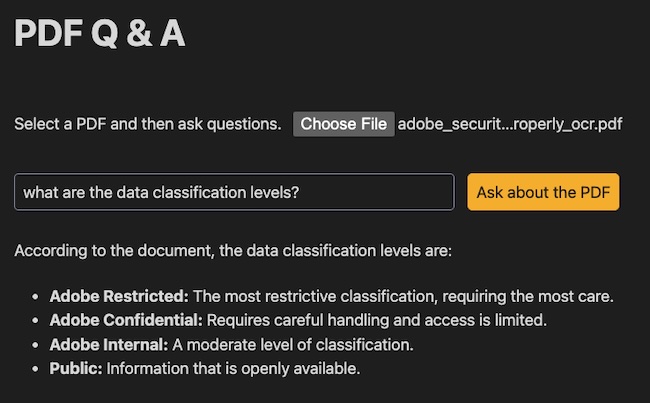
And finally, here's what happens if I try to go off topic:
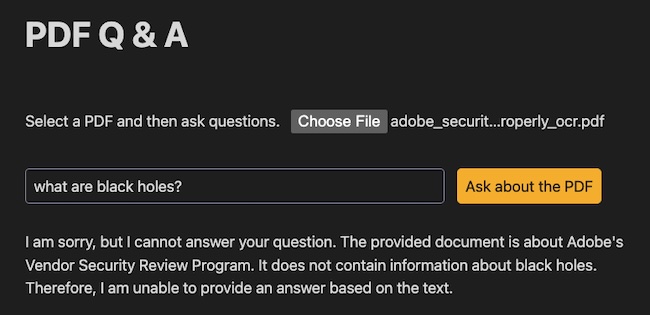
As a reminder, you can't use beefy PDFs in this demo, and unlike yesterday's post, I didn't add a good error handler for that. Sorry!
See the Pen Chrome AI, PDF.js - QA by Raymond Camden (@cfjedimaster) on CodePen.
Version Two
I was pretty happy with the initial version, but I was curious if the on-device model could handle creating references to the document?
I began by keeping the page text in an array instead of one big string:
let fullText = [];

for (let i = 1; i <= pdf.numPages; i++) {
    const page = await pdf.getPage(i);

    const textContent = await page.getTextContent();

    // Note: 'item.str' is the raw string. 'item.hasEOL' can be used for formatting.
    const pageText = textContent.items.map(item => item.str).join(' ');

    fullText.push(pageText);
}
Then I modified by enableChat a few ways. First, I created a new block of text that marked the pages:
let pagedText = '';
textArr.forEach((t,x) => {
    pagedText += `

Page ${x+1}:
${t}

`;
});
I think this could be better, perhaps with a --- around the page content. Next I modified the system prompt:
let session = await LanguageModel.create({
    initialPrompts: [
        {role:'system', content:`You answer questions about a PDF document. You only answer questions about the document. If the user tries to ask about something else, tell them you cannot answer it. The text is split into pages marked by: "Page X:", where X represents the page number. When you answer questions, always give a reference to the page where you found your answer. Here is the text of the document:\n\n${pagedText}`}
    ]
});
Oddly, this wasn't enough. I'd ask a question, but wouldn't get references. However, if I asked for references, I did. So the final change was to prefix each user prompt as well:
let response = await session.prompt(`When answering this question, try to include the page number: ${q}`);
This seemed to do it:
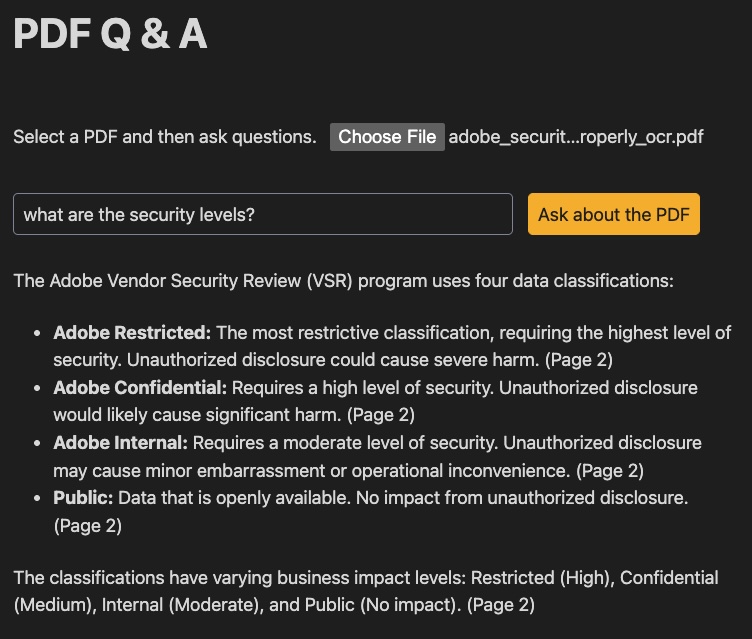
This is not always accurate. For example, when I asked: "what can you tell me about adobe confidential data?", which is covered in detail on page 3, the result focused on page 2. The confidential data classification is introduced on page 2, but is covered more in depth on page 3. Maybe improving the page formatting in the prompt would help here, but I'm happy with this demo so far. (If you want a copy of the PDF I tested with, you can find it here.)
See the Pen Chrome AI, PDF.js - QA by Raymond Camden (@cfjedimaster) on CodePen.
As I said yesterday, give these demos a spin and let me know what you think!