Adding Hardcover.app Data to Eleventy

It's been far too long since I shared an Eleventy tip, and to be fair what I'm showing today can be used anywhere, but hopefully this will be useful to someone else out there. I enjoy tracking my media consumption, specifically movies and books. For movies I've been real happy with Letterboxd (you can see my profile if you wish). For books, I used Goodreads for a very long time, but have wanted to migrate off the platform and switch to something else. There's alternatives, but none really worked well for me. Earlier this week, an old friend of mine (hi Jason!) suggested Hardcover. This is a Goodreads competitor built, in their own words, out of spite, and I can totally get behind that. I signed up and imported my Goodreads data in about five minutes and while I haven't dug deep into the site at all, it seems totally fine to me so I'll be sticking there. You can find my profile here: https://hardcover.app/@raymondcamden
Ok, you aren't here (I assume) to peruse my books and see how few books I consume (teenage Ray would be embarrassed by the number). The biggest reason I switched to Hardcover was because of their API, which I wanted to use to display it on my Now page. Again, I don't honestly think anyone cares what I'm reading/listening to/watching, but I think it's cool and that's all that matters on my little piece of the Internet.
Their API docs make it incredibly easy to get started, including the ability to quickly run your own requests for testing. Their API is GraphQL based, which I'm a bit rusty with, but I had no trouble getting started. My goal was to simply get my list of books I'm currently reading. To do this, I needed:
- My user id
- The status value for a book that is currently being read.
For the first one, I used their link to a GraphQL client and ran this query:
query Test {
    me {
      username
      id
    }
  }
I didn't actually need my username, but it was already there. Anyway, this gave me my user id, 65213.
Next, I needed to know which books were in my "Currently Reading" status and luckily, they literally had a doc page for that, "Getting Books with a Status", that used that particular value. Here's their query:
{
  user_books(
      where: {user_id: {_eq: ##USER_ID##}, status_id: {_eq: 2}}
  ) {
      book {
          title
          image {
              url
          }
          contributions {
              author {
                  name
              }
          }
      }
  }
}
Simple, right? There is one minor nit to keep in mind - their dashboard makes it easy to get your key, but it expires in one year and you can't programatically renew it. My solution? Adding a reminder to my calendar. Ok, now to how I actually used it.
Providing the Data to Eleventy
Here's how I added this to Eleventy, and again, you should be able to port this out anywhere else as well. I added a new file to my _data folder, hardcover_books.js. Per the docs for global data files in Eleventy, whatever my code returns there can be used in my templates as hardcover_books. Here's my implementation:
const HARDCOVER_BOOKS = process.env.HARDCOVER_BOOKS;

export default async function() {

    if(!HARDCOVER_BOOKS) return [];
    let req;

    let body = `
    {
    user_books(
        where: {user_id: {_eq: 65213}, status_id: {_eq: 2}}
    ) {
        book {
            title
            image {
                url
            }
            contributions {
                author {
                    name
                }
            }
        }
    }
    }
    `.trim();

    try {
        req = await fetch('https://api.hardcover.app/v1/graphql', {
            method:'POST',
            headers: {
                'authorization':HARDCOVER_BOOKS,
                'Content-Type':'application/json'
            },
            body:JSON.stringify({query:body})
        });
    } catch (e) {
        console.log('Hardcover API error', e);
        return [];
    }

    let data = (await req.json()).data.user_books.map(ob => ob.book);
    /* normalize authors */
    data = data.map(b => {
        b.authors = b.contributions.reduce((list,c) => {
            if(c.author) list.push(c.author.name);
            return list;
        },[]);
        return b;
    });

    return data;


};
Most of the code is me just calling their API and passing the GraphQL query, nothing special. However, I did want to shape the data a bit before returning it so I simplify it to an array, and then take the complex data of authors and simplify it to a simpler array of strings. Here's an example of how this looks (reduced to two books for length):
[
  {
    title: 'Frankenstein',
    image: {
      url: 'https://assets.hardcover.app/external_data/46789420/6823e1155b2785ae31ac59ccb752c4f33b599b35.jpeg'
    },
    contributions: [
      { author: { name: 'Mary Shelley' } },
      { author: { name: 'Paul Cantor' } }
    ],
    authors: [ 'Mary Shelley', 'Paul Cantor' ]
  },
  {
    title: 'The Business Value of Developer Relations',
    image: {
      url: 'https://assets.hardcover.app/edition/30438817/content.jpeg'
    },
    contributions: [ { author: { name: 'Mary Thengvall' } } ],
    authors: [ 'Mary Thengvall' ]
  },
]
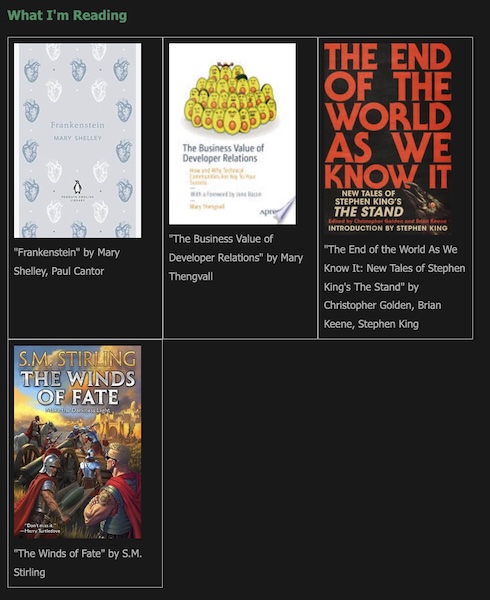
The last bit was adding it to my Now page. I used a simple grid of image cover + titles:
<div class="films">
{% for book in hardcover_books  %}
  <div class="film">
  {% if book.image != null %}
  <img src="https://res.cloudinary.com/raymondcamden/image/fetch/c_fit,w_216/{{book.image.url}}" alt="Cover of {{ book.title }}">
  {% else  %}
  <img src="https://res.cloudinary.com/raymondcamden/image/fetch/c_fit,w_216/https://static.raymondcamden.com/images/no_cover_available.jpg" alt="No Cover Available">
  {% endif %}
  "{{ book.title  }}" by {{ book.authors | join: ', ' }}
  </div>
{% endfor %}
</div>
Pardon the class names there - as I already had CSS for my films, I just re-used them as I was being lazy. Also note that sometimes a book will not have an image cover. On the web site, they use a few different images to handle this, but the API doesn't return that. I generated my own and put it up in my S3 bucket. If you don't feel like clicking over to my Now page, here's how it looks:
If you would like to see this code in context with the rest of the site, you can find my blog's repo here: https://github.com/cfjedimaster/raymondcamden2023. Let me know if you end up using their API!