Using Chrome AI for Color Suggestions

Today's blog post came to me on the way to dropping of my kids at school and made complete sense to me, but I've also got the flu and am heavily medicated, so take that for what you will. The idea was simple, given a description of something in the real world, could I use AI to generate RGB colors that would represent that abstract idea. I thought this could be a good use of Chrome's built-in AI model and decided to whip up a quick demo.
The front end is pretty simple, just a form for you to enter your description and a place for the results:
<h2>Description to Color</h2>
<p>
	In the form field below, describe the color you are trying to recreate and Chrome AI will attempt to match it with RGB colors.
</p>
<div class="twocol">
	<div>
	<p>
		<textarea id="input"></textarea>
	</p>
	<p>
		<button disabled id="runBtn">Determine Color</button>
	</p>
	</div>
	<div id="result"></div>
</div>
The JavaScript is where the magic lies of course. I'll skip over the DOM manipulation stuff and focus on the parts specific to Chrome's AI implementation. First, I created a schema to constrain my results:
const colorResultSchema = {
	type:"object",
	properties: {
		description:{
			type:"string"
		},
		colors: {
			type:"array",
			items: {
				type:"string"
			}
		}
	}
};
Essentially I wanted the model to explain it's results at a high level, and then just return a list of colors.
Next, here's how I create my session from the model - the important bit being the system prompt:
session = await window.LanguageModel.create({
    initialPrompts: [
        { role: 'system', content: 'You take a description of a color and attempt to match the description to 1-5 different RGB colors that could be used on a web site. You will return an explanation of your results along with a list of RGB values in hexadecimal format.' },
    ],
    monitor(m) {
        m.addEventListener("downloadprogress", e => {
            console.log(`Downloaded ${e.loaded * 100}%`);
            /*
                    why this? the download event _always_ runs at
                    least once, so this prevents the msg showing up
                    when its already done. I've seen it report 0 and 1
                    in this case, so we skip both
                    */
            if(e.loaded === 0 || e.loaded === 1) return;
            $result.innerHTML = `Downloading, currently at ${Math.floor(e.loaded * 100)}%`;
        });
    }
});
And the last bit is just taking the user's prompt, running it, and displaying the results:
let result = await thisSession.prompt(input, { responseConstraint: colorResultSchema });
result = JSON.parse(result);

$result.innerHTML = `
<h2>Result</h2>
<p>
${result.description}
</p>
<p>
`;
for(let i=0;i<result.colors.length;i++) {
    $result.innerHTML += `RGB: ${result.colors[i]} <div class="swatch" style="background-color: ${result.colors[i]}"></div><br>`
}
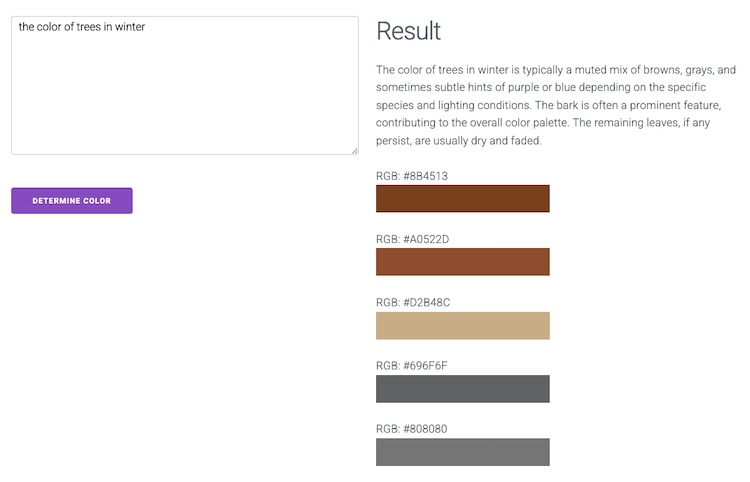
I'm going to embed the demo below, but as the Prompt API is still behind a flag, here's some screenshots:
Bonus points if you identify this prompt:
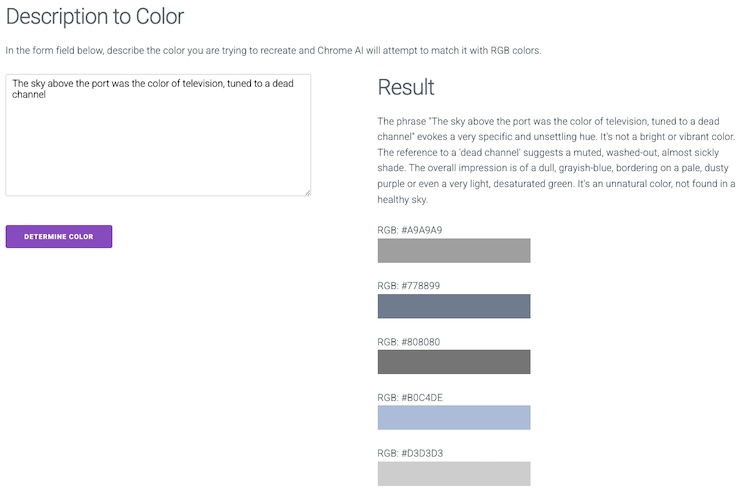
You can see the full code, and play with it yourself (again, if you enable that flag in Chrome), below:
See the Pen Description to Color by Raymond Camden (@cfjedimaster) on CodePen.
Header photo by Mika Baumeister on Unsplash