Example of form validation in a jQuery Mobile Application
Over the weekend I decided to write up a quick example of form validation in jQuery Mobile. Obviously there are many ways you can accomplish this and I just wanted to take my own little spin with it. Here's what I came up with and I'd love to hear how other jQuery Mobile users are doing validation.
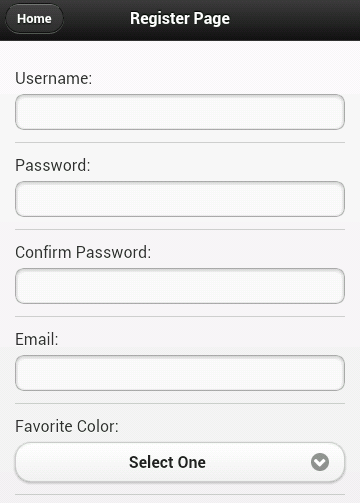
Let's start off with a real simple jQM site. It will have a home page with links to two sub pages. My form will be on the second page. To be honest, I could have just built a one page site, but I wanted something with a trivial bit of navigation to it so it felt just a bit more realistic. I won't bore you with all the code (you can view source on the demo yourself), but here is our simple form:
The form consists of 6 fields: username, password, the password confirmation, your favorite color, and your home town. The validation rules should be:
- Everything but the home town is required.
- Username, password, and the confirmation must be 5 characters minimum.
- The password confirmation must match the password.
Pretty simple, right? Without any validation at all, you can take this for a spin here:
And if you don't want to bother with that - a quick screen shot (which I generated from Adobe Shadow thank you very much):
Ok, so let's talk validation. It would certainly be cool if we could just use HTML5 form validation, right? I mean, look at the mobile browser support for Canvas:
That's a hell of a lot of green. So obviously - if there is that much support for canvas, which is only mildly useful in practical matters - surely there is even higher support for form validation, something we probably all use every single day.
*sigh*
Ok, so moving on from that, let's talk options. Obviously we can roll our own JavaScript. It isn't terribly difficult to do so. But I thought it might be nice try the jQuery Validation plugin. I've blogged on it before (see links at the bottom) and I liked how simple it made things. I thought I'd give it a shot here and see how it ran.
The plugin provides two main ways of adding validation to a form. You can either add items to a class attribute of your form or supply a list of validation rules when initializing the plugin. Personally, I don't know which I prefer. I wish the plugin made use of a data-attribute instead of a class, but I like seeing my rules in the HTML. I went with that approach but just keep in mind you have the other option as well.
Here's the updated HTML for the register page (just the form bits):
Notice the addition of class="required" to my fields requiring validation. Also note the minlength of the first three fields. This is - pretty much - all it takes. The one big obvious piece missing is the "confirmation must match password" field but that can be handled in a custom rule. I also had to initialize the validation but that's one line of code: $("#registerForm").validate();
So far so good, right? But check out the result:
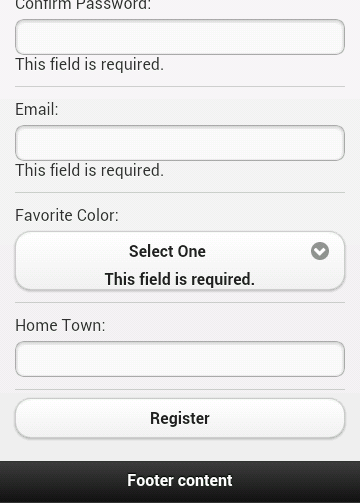
First, the errors don't really stand out and second - note the error for the drop down. It's actually inside the custom jQM drop down field. Not good. Let's tackle the design first. By default, the validation plugin will use an error class for displaying errors. That means it is pretty trivial to make it look a bit nicer:
Which results in:
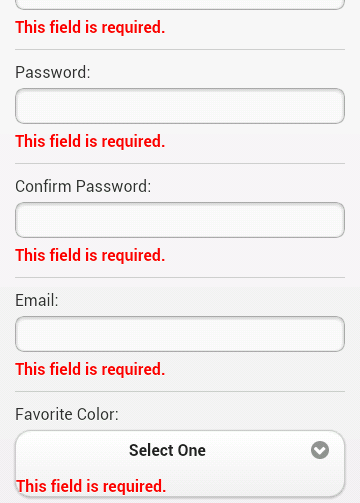
Nice. About halfway there. You can demo this version here: Round 2
So what about the weird drop down behavior? We can use another feature of the plugin to handle that. You can use a property, errorPlacement, that allows you to dynamically determine where errors should be written out. While we're at it, we can also go ahead and create the custom rule for password matching.
To be honest, the use of .parent() there was a bit of a guess, but it worked on first try. In case you're curious, to add the custom validation to the second password field I just had to add the name to the class list: class="required passmatch".
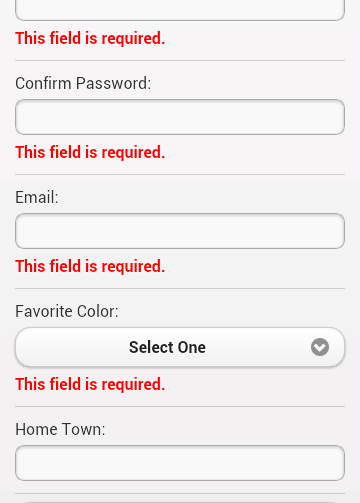
You can demo this version here: Round 3
So, what do you think? I'd like to work on this a bit more. On the iPad, the errors are left aligned under the labels, which is kinda cool, but I could also see them being aligned with the fields instead. On desktop it is way off but I kinda figure that is an edge case and not something I'd have to worry about. As always, comments and critiques are welcome.

[code]
errorPlacement: function(error, element) {
// I wanted my errors to prepend the label with a simple *required*
error.prependTo(element.parent());
// this was for a checkbox field that sits all on one line, didn't have a label to append to.
if (error.attr('htmlfor') == 'interest') {
$(element.parent()).addClass('highlightError');
}
},
// because I was doing my own custom highlight function, I had to add my own "unhighlight"
unhighlight: function(element, errorClass) {
$(element).removeClass(errorClass);
if ($(element).attr('name') == 'interest') {
$($("#interest").parent()).removeClass('highlightError');
}
},
[/code]
- Why won't Spry Validation work with JQM?
- See this post: http://forums.adobe.com/message/4660779
- Can you work up an example of JQM & Spry that works when using a Form Submit?
I find it curious that Dreamweaver includes both JQM & Spry but I have yet to see an example or post anywhere.
Thanks..
ps: thanks for the simple captcha.
One question:
- Here is my form: http://cerberus.clearwave.com/jerry/validation_02....
- Since I'm using JQM collapsible panels, how do I get validation to pop-up a nice box saying "The following fields are required" and then have it take to me to the first required field? as it is now, if the panel is collapsed, you have to go find the required fields..?
check out jQM's new popups.
"and then have it take to me to the first required field? as it is now, if the panel is collapsed, you have to go find the required fields.."
This would be more complex. If you know which is your first 'bad' field, you could use jQuery to get the parent() which should be the collapsible div and check it's status. I can't remember offhand the exact API, but check the docs. There is a way to see if a div is collapsed or not.
There seems to be a new feature in validator called equalTo
An alternative to check for same password being typed,
In HTML
<input type="password" name="password2" id="password2" equalTo="password" >
In Javascript (if we want to override default error message)
$("#registerForm").validate({
messages: {
password2: {
equalTo: "Confirmation password must match."
}
....
http://docs.jquery.com/Plugins/Validation/Methods/...
I am just using the inline way of "calling" equalTo, that's all
It works, I am using it in my code.
Thank you for the article...
I'm moving some tiny steps into jQuery Mobile but validation is truely driving me crazy.
I've tried 200.000 tutorials and methods but the main problem is that if I get in the form page with a link that uses data-ajax=false everything works.
If I do it in ajax the form is sent without any kind of validation.
Probably I didn't understand much about where to put the script that should handle validation?
Right now I put in <head> and I've tried this:
<script type="text/javascript">
$(document).bind('pageinit', function () {
$(insert).validate({ // or form #id
rules: {
field: "nick" // field name not #id and has class="required
},
submitHandler: function (form) {
alert('data submitted');
return false;
}
});
});
</script>
But it's not working :(
Can you please help? It is becoming my nightmare.
I've tried every kind of tutorial in the internet and I got to this final resolution:
if I use a link to get to the form's page the link has to have or ajax-data=false or rel="external" (but this way I'd lose the cool transitions) otherwise the form validation will not work (but it'll work on reload).
Your suggestion cleverly got to the point: my pageinit is fired _only_ if I modify the incoming link to disable ajax.
I want to pull all my hairs!
Here's my "vanilla" pages:
https://gist.github.com/anonymous/0c33b152bab6135c...
Therefore, if you want to have code that runs on a page being created, your current code may need to get more specific.
For example: $(document).bind('pageinit', function () {
Says to listen to ALL pageinit calls. You probably want the one for your specific page. Imagine that page has a <div data-role="page" id="second">. You could do this instead:
$(document).on('pageinit', '#second', function () {
The js comes from standard google liks for jquery and jquery mobile (of course jquery is before jquery mobile in the head section).
So, excuse me again, if I have simple code like this:
(insert is my form's id)
$('#insert').submit(function() {
alert('Hey, you pressed the button!');
return false;
});
What should I change?
It's related to a very specific form and, again, it works if I reload the page.
Probably I simply have bad basic understanding of how jquery works but official documentation seems to be not sufficient for me...
I think it's time to buy a book :)
I've simply switched to multi-page and now it works gracefully!
Here's info for anybody who suffered like me:
http://jquerymobile.com/demos/1.2.0/docs/pages/pag...
:)
Thanks for you help and your precious blog, Raymod :)
I'm trying to solve a small but annoying issue on jquery form: my form gets submitted every time an user press "go" on android keyboard or enter on the pc.
How can this be solved in the correct way?
Thanks a lot and excuse me for bothering.
Here's the way I've found (correctly working for my tests):
function DisabilitaSubmit()
{
$('input,select').keypress(function(event) { return event.keyCode != 13; });
}
You think this is a good method or a bad one?
Thanks :)
With the new markup format of text inputs in <a href="http://view.jquerymobile.com/1.3.1/demos/widgets/t... 1.3.1</a>, it seems error placement in jQuery Validation gets thrown off- jQM 1.3.1 adds a div wrapper around the input, so that div is now what I need to style rather than the input, and the .valid class applied to the input as well needs to be on that parent div. I know I can control this via errorPlacement, but it seems like there should be a quicker solution to this - before I update all my errorPlacement calls. Any ideas?
http://jsfiddle.net/ericburnley/zeTa3/26/
Thanks!!