Twitter: cfjedimaster


Address: Lafayette, LA, USA

Example of Autocomplete in jQuery Mobile

03-27-2012 40,958 views Mobile, jQuery, ColdFusion 59 Comments

A while back a reader (Bobby Tuck) asked me about how to do autocomplete in a jQuery Mobile application. He tried using jQuery UI's autocomplete control but found it didn't integrate well on a mobile device with the keyboard popped up. I suggested an alternative and (finally!) got around to building a mockup. Here's my take on it - feel free to rip it apart and suggest alternatives and improvements.

Let's begin with a simple jQuery Mobile template.

view plain print about
1<!DOCTYPE html>
2<html>
3<head>
4<title>Autocomplete Example</title>
5<meta name="viewport" content="width=device-width, initial-scale=1">
6<link rel="stylesheet" href="http://code.jquery.com/mobile/latest/jquery.mobile.min.css" />
7<script src="http://code.jquery.com/jquery-1.7.1.min.js"></script>
8<script src="http://code.jquery.com/mobile/latest/jquery.mobile.min.js"></script>
9</head>
10
11<body>
12
13<div data-role="page" id="mainPage">
14
15    <div data-role="header">
16        <h1>Autocomplete Example</h1>
17    </div>
18
19    <div data-role="content">
20
21        <p>
22        <input type="text" id="searchField" placeholder="Search">
23        </p>
24
25    </div>
26
27    <div data-role="footer">
28        <h4></h4>
29    </div>
30
31</div>
32
33<script>
34$("#mainPage").on("pageshow", function(e) {
35    console.log("Ready to bring the awesome.");
36
37});
38</script>
39
40</body>
41</html>

I've got a few things going on here to prepare for the autocomplete control. I've got a text field that will accept the user input. I've got a page event handler (this is jQuery Mobile specific) that will fire when the page loads. Now let's talk about my proposed solution.

I thought it might be handy to use a jQuery Mobile listview to render the suggestions. So I began by adding an empty list view beneath my form field:

view plain print about
1<p>
2<input type="text" id="searchField" placeholder="Search">
3<ul id="suggestions" data-role="listview" data-inset="true"></ul>
4</p>

I then wrote some simple code to handle changes to the input field.

view plain print about
1$("#mainPage").on("pageshow", function(e) {
2    console.log("Ready to bring the awesome.");
3    var sugList = $("#suggestions");
4
5    $("#searchField").on("input", function(e) {
6        var text = $(this).val();
7        if(text.length < 1) {
8            sugList.html("");
9            sugList.listview("refresh");
10        } else {
11            $.get("service.cfc?method=getSuggestions", {search:text}, function(res,code) {
12                var str = "";
13                for(var i=0, len=res.length; i<len; i++) {
14                    str += "<li>"+res[i]+"</li>";
15                }
16                sugList.html(str);
17                sugList.listview("refresh");
18                console.dir(res);
19            },"json");
20        }
21    });
22
23});

The code is rather simple I think. We bind to the "input" event for the text field and check the value. Now - most autosuggest controls make a determination on whether or not it makes sense to fire off a request. You may - for example - decide you only want to ask for autocomplete results when the user has entered 3 or 4 characters. Mine will always fire as long as you have at least one character. I did that because my data (a list of names) was a bit short and I wanted to ensure that the demo was easy to use. Obviously you can alter that to your liking.

If the user entered something, we fire off a request to the server. (In this case to a ColdFusion script that performs a search against a list of names. It's trivial enough that I won't include it in this blog entry, but if anyone wants it, you can view it here: http://pastebin.com/pFGggRc3) The server responds with an array of names. We can then take that array and create a simple HTML string out of it. This string is inserted into our empty list and then we simply call the jQuery Mobile refresh method to ensure it is marked up correctly.

And that's it. I tested it on my mobile device and while the keyboard will cover some of the results, it seems to work well:
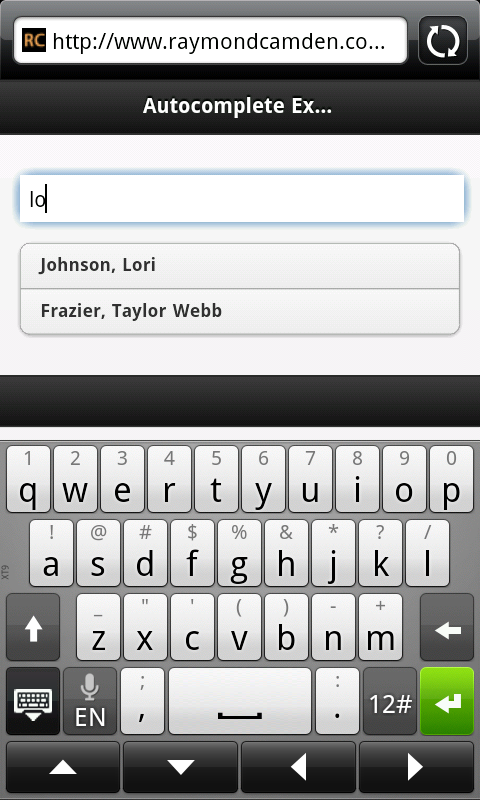
Obviously this demo needs a bit more work to be complete. Your list options would probably link to the detail for your search results. You can find the demo below as well as the complete code.

view plain print about
1<!DOCTYPE html>
2<html>
3<head>
4<title>Autocomplete Example</title>
5<meta name="viewport" content="width=device-width, initial-scale=1">
6<link rel="stylesheet" href="http://code.jquery.com/mobile/latest/jquery.mobile.min.css" />
7<script src="http://code.jquery.com/jquery-1.7.1.min.js"></script>
8<script src="http://code.jquery.com/mobile/latest/jquery.mobile.min.js"></script>
9</head>
10
11<body>
12
13<div data-role="page" id="mainPage">
14
15    <div data-role="header">
16        <h1>Autocomplete Example</h1>
17    </div>
18
19    <div data-role="content">
20
21        <p>
22        <input type="text" id="searchField" placeholder="Search">
23        <ul id="suggestions" data-role="listview" data-inset="true"></ul>
24        </p>
25
26    </div>
27
28    <div data-role="footer">
29        <h4></h4>
30    </div>
31
32</div>
33
34<script>
35$("#mainPage").on("pageshow", function(e) {
36    console.log("Ready to bring the awesome.");
37    var sugList = $("#suggestions");
38
39    $("#searchField").on("input", function(e) {
40        var text = $(this).val();
41        if(text.length < 1) {
42            sugList.html("");
43            sugList.listview("refresh");
44        } else {
45            $.get("service.cfc?method=getSuggestions", {search:text}, function(res,code) {
46                var str = "";
47                for(var i=0, len=res.length; i<len; i++) {
48                    str += "<li>"+res[i]+"</li>";
49                }
50                sugList.html(str);
51                sugList.listview("refresh");
52                console.dir(res);
53            },"json");
54        }
55    });
56
57});
58</script>
59
60</body>
61</html>

P.S. So hey - what about the HTML5 Datalist option? Unfortunately on mobile it is only supported in Opera. You can find details on support here: http://caniuse.com/#feat=datalist

59 Comments

  • Simon #
    Commented on 03-27-2012 at 12:34 PM
    Couldn't pick of the drop down list on iPod touch iOS 5 which I'm guessing is the same as an iPhone
  • Commented on 03-27-2012 at 1:08 PM
    Simon, did you read the post? That was intentional. I mentioned that in a real app you would link the results to something.
  • Mike #
    Commented on 03-27-2012 at 5:22 PM
    Would it be possible to user your example but search in a list or from csv file?
  • Commented on 03-27-2012 at 8:57 PM
    Yes. Definitely possible.

    Also - to all - Andy Mathews turned this concept into an even easier to use plugin: http://www.andymatthews.net/read/2012/03/27/jQuery...
  • Commented on 03-27-2012 at 9:46 PM
    This is the way I've handled it in my Mobile AIR apps also. Running a filter on the dataprovider of a list element.
  • Commented on 03-27-2012 at 9:48 PM
    Nice - I knew that time I spent learning Flex wasn't a waste. :)
  • Commented on 05-21-2012 at 9:53 AM
    Hi, I successfully used Andy Mathews's plugin for autocompletion in my jquery mobile app using a input type="search" field.
    It works very well in browsers (both desktop and android) but when I package my app with phonegap for android, there is a kind of history (or suggestions) div under my input field that partially hides my results div.
    Have you ever encountered this and/or know how to disable it? (I've tried few webkit tricks with no success)
  • Commented on 05-21-2012 at 9:55 AM
    Try adding this to the form field:

    autocomplete="off"
  • Commented on 05-21-2012 at 11:14 AM
    that's part of the "webkit tricks" I had already tried.
    I've inspected the page with weinre and was not able to find the div.
    Actually I realised that it does not appear under my input but in the middle of the screen so I thought it had something to do with the virtual keyboard.
    I ended with renaming the name of my input (was "immatriculation") and now I don't see the nasty div anymore.
    Weird, but I don't think I'll dig deeper for the moment...
  • Amit #
    Commented on 05-29-2012 at 6:58 AM
    Please Give Me Remember password coding using phonegap..

    localstorag will work in single page next page it not show the in case of this windows.localstorage(key,value);
  • Commented on 05-29-2012 at 8:45 AM
    Amit, I appreciate you want help on this, but I'm not going to write the code for you. Localstorage is per domain, not per page. It will work fine in PhoneGap. It is -very- trivial to use.
  • Commented on 05-29-2012 at 8:54 AM
    http://lmgtfy.com/?q=local+storage+phone+gap ?
  • Commented on 07-08-2012 at 10:47 PM
    Playing around with this and Andy Mathews' code tonight.

    What I've done is put the search bar in the footer. It works great the first time a page is loaded. However, if I click on one of the search results and go to a different page, the search autocomplete doesn't work.

    There's no console errors. Inspecting the page shows the javascript still present but only listed under the original page (I'm using the single rather than multi-page jquery mobile model, but jquery is "pushing" pages to a stack in case I go back???).

    If I hard refresh the page the autocomplete works - until I click to a different page, then it is broke again.

    I rewrote the jQuery selector to be page sensitive, like:

    $("div[data-role='page']").on("pageshow", function(e) {

    I'm thinking its because the pageshow event isn't being fired after a transition to a different page? Any ideas why that would be?
  • Commented on 07-09-2012 at 7:05 AM
    To be clear, your modified version is only running once?
  • Commented on 07-09-2012 at 10:31 AM
    It appears that way (added a console logging statement to output the page div id to make sure).

    On first load (or hard refresh) my console logs that I'm on the page and jquery attaches autocomplete to the search input. If I click a link jquery transitions to the next page. Despite having set this to have a fresh call to the server for the new page, the js to attach the autocomplete attachment never fires again.

    Inspecting the page I see that previous page content is appended to the body of the document. The script for attaching the autocomplete is present there but not in the newly loaded page div.
  • Commented on 07-09-2012 at 11:26 AM
    I assume your other pages use <div data-role="page">, right? Perhaps you can share some more code via pastebin.
  • Commented on 07-09-2012 at 11:34 AM
    Yes, I am using <div data-role="page" >

    Ultimately, the only way I've been able to make this work with the search in the footer is to disable the jQuery mobile transitions. I've had to add "data-ajax='false'" to every single link (pain in the rear) in order to keep jQuery mobile from grabbing the desired page, parsing it to look for only the inner page content, and not execute the autocomplete hookup.

    In jQuery mobile 1.1 you're SUPPOSED to be able to add "data-ajax='false'" to a container have it apply to all child elements. Despite using 1.1, however, I haven't been able to get this to work; http://jquerymobile.com/test/docs/pages/page-links...
  • Commented on 07-09-2012 at 11:35 AM
    Question - did you keep my console.log msg in - and did it show but the autosuggest not work?
  • Commented on 07-09-2012 at 12:42 PM
    Yes. The console.log works - on the first document request. Subsequent document requests do not cause the javascript to be run again when it is inside a data-role="footer" div. That is, until I turned off the data-ajax="false".
  • Commented on 07-09-2012 at 12:49 PM
    You mentioned you were using the field in the footer, right? If so, did you switch from an ID to a class based form field?

    $("#searchField").on("input", function(e)

    to

    $(".searchField").on("input", function(e) {

    and obviously removing id=".." from the field and using class=".." instead.
  • Commented on 07-09-2012 at 10:18 PM
    I had been accounting for the different divs on the search field. However, while double checking that I had one of those faceplam moments: I had left the results div id (the #suggestions data-role listview) the same.

    Duh. Although the exercise has been a good one and forced me to dig into how jQuery Mobile 'caches' pages.
  • Commented on 07-10-2012 at 8:03 AM
    I'm just glad you figured it out.
  • Lasane.In #
    Commented on 08-27-2012 at 10:06 AM
    Nice And step By Step Tutorial. Thanks
  • al #
    Commented on 09-18-2012 at 2:25 PM
    I am using Andy Mathews' code with aspx page for data. It returns array of strings, but final result is only one letter on one line. Here is the code What should be after success?
    $("#searchField").autocomplete({
    target: $('#suggestions'),
    source:
    function (request, response) {
    $.ajax({
    type: "POST",
    url: "search.aspx/GetSearch",
    data: "{search:'" + $("#searchField").val() + "'}", // passing value of txtSearch input
    contentType: "application/json; charset=utf-8",
    dataType: "json",
    success: function (data) {

    response(data.d, function (item) {
    // alert(data.d);
    return { value: item.name
    }
    });
    },
    failure: function (response) {
    alert("Issues Here");
    }
    });
    },
    link: 'target.html?term=',
    minLength: 1,
    transition: 'slide'
    //matchFromStart: false
    });
    });
    Thanks
  • Commented on 09-18-2012 at 4:06 PM
    I'd recommend filing an issue on Andy's page (https://github.com/commadelimited/autoComplete.js) since his code is going to be different than mine, and a bit off topic for this blog post.
  • Commented on 10-26-2012 at 7:18 AM
    the min version is functionally different vs the normal version. at this point:"e.isPlainObject(n)?s.push("
  • Commented on 10-26-2012 at 7:31 AM
    Andrea, if you are talking about an issue with jQuery Mobile, I'd recommend filing a bug report at their site.
  • AKBAR #
    Commented on 11-02-2012 at 5:57 AM
    Not working in mozilla and chrome.
  • Commented on 11-02-2012 at 5:59 AM
    *How* ia it not working? What do you see in the remote debugging console? I assume you mean Chrome and Firefox for Mobile.
  • Commented on 11-06-2012 at 10:33 AM
    hey there!

    thanks for the tutorial! i'm playing around with jquerymobile atm and found this very helpful and it works nicely. since i'm using php, here is what i did:

    ajax part of your script:

    $.get("example.php", {suggest: txt}, function(data) {
    var str = "";
    for (var i=0; i<data.length; i++) str += "<li><a href=\'some.php?show="+data[i]["id"]+"\'>"+data[i]["name"]+"</li>";
    str += "<li data-theme=\'a\'><a href=\'some.php?find="+encodeURI(txt)+"\'>Search “"+txt+"”</li>";
    sugList.html(str);
    sugList.listview("refresh");
    }, "json");


    example.php:

    $array = array();
    $mysql = mysql_query("SELECT id, name FROM somewhere WHERE something LIKE '".mysql_real_escape_string($_GET['suggest'])."%' LIMIT 5");
    while ($row = mysql_fetch_assoc($row)) $array[] = $row;
    echo json_encode($array);
  • Amanda #
    Commented on 11-20-2012 at 3:45 PM
    Hi! Great tutorial...exactly what I was looking for. The .on("input" is not listening to my text box. I've tried selecting it as a class, id, and with the name. I can't seem to get it to listen. Any ideas?
    Thanks!
  • Commented on 11-20-2012 at 3:48 PM
    Where are you testing it?
  • Amanda #
    Commented on 11-20-2012 at 3:54 PM
    Google Chrome
  • Commented on 11-20-2012 at 3:55 PM
    Not sure then. Is it online where I can see?
  • Amanda #
    Commented on 11-21-2012 at 7:15 AM
    No, I can't put it online right now. Thanks for your help though. Your tutorial was great!
  • ROBERT #
    Commented on 12-06-2012 at 1:26 PM
    $("#searchPage").on --> This event is not firing in IE. It gives error"object is not supported : on"
  • Commented on 12-06-2012 at 1:32 PM
    The on method works in recent jQuery builds. Be sure you are using the latest jQuery.
  • ROBERT #
    Commented on 12-06-2012 at 1:34 PM
    I am using asp.net mvc. Also all the jquery scripts are placed in master/layout page. Any ideas why I am receiving the above error error. I am also new to jquerymobile.

    @model Title
    @{

    ViewBag.Title = "Search";
    Layout = "~/Views/Shared/_Layout.cshtml";
    }
    @using (Html.BeginForm("Search", "Title", FormMethod.Post, new { id = "Form1" }))
    {
    <div id="searchPage">
    <p>

    <input type="text" id="searchField" placeholder="Search"/>
    <ul id="suggestions" data-role="listview" data-insert="true"></ul>
    </p>
    </div>
    }
    <script type="text/javascript">
    $("#searchPage").on("pageshow", function (e) {
    debugger;
    var sugList = $("#suggestions");

    $("#searchField").on("input", function (e) {
    var text = $(this).val();
    if (text.length < 1) {
    sugList.html("");
    sugList.listview("refresh");
    } else {
    $.ajax(
    {
    type: "GET",
    url: "http://servername:port/page/select?q=name:"; + text + "&fl=name&sort=name asc",
    data: "{}",
    contentType: "application/json; charset=utf-8",
    dataType: "json",
    success: function (data) {
    var str = "";
    for (var i = 0, len = data.length; i < len; i++) {
    str += "<li>" + data[i] + "</li>";
    }
    sugList.html(str);
    sugList.listview("refresh");
    },
    error: function (xhr, status, errorThrown) {
    alert(errorThrown);
    }

    });

    }
    });

    });
    </script>
  • Commented on 12-06-2012 at 1:37 PM
    Please see my earlier comment. You need to ensure you are loading the latest jQuery library.
  • ROBERT #
    Commented on 12-06-2012 at 2:37 PM
    Thanks for the suggestion.
    I was using the old jquery libraries.. My Bad!!
    I tried using the new one but mine other screens stopped working now(giving some javascript "o.length null" error).
    Is there any workaround of "on" function with old jquery libraries?
  • Commented on 12-06-2012 at 2:39 PM
    Yes - just use one of the older ones. live() may work. Here is the list: http://api.jquery.com/category/events/event-handle...
  • ROBERT #
    Commented on 12-06-2012 at 2:52 PM
    yes, live() is working.!!
    Many Thanks!!
  • hp178 #
    Commented on 12-20-2012 at 4:43 AM
    Hey,

    I had a query.
    Suppose i want to search from a table which contains, say, around a thousand records.
    Would it be easier for me to ping the database each time a key is pressed or should i bring down the whole list into my local database and then keep refining my search?
    Which approach would consume less process cycles AND provide faster results?

    Also what method have you used in your code?
  • Commented on 12-20-2012 at 5:47 AM
    I think moving the db locally has its plusses and minuses. If you move the data locally, you have to:

    a) write code to do the initial seed
    b) write code that, periodically, sees if there is newer data on the remote server

    That isn't hard, but it isn't trivial either.

    That being said, even with 1K records in your database, you only want to return a max number of matches anyway, like 50. So I'm not necessarily sure it is worth the effort to create a local copy.

    Sorry I don't have a firm answer for you, but like most things, it depends.
  • hp178 #
    Commented on 12-20-2012 at 6:41 AM
    So

    You mean, that if i am searching "Raymond" in my database.
    When i type 'r' the plugin will search for names beginning with 'r' in the database and when i add an 'a' to it, it will search the database again for names beginning with 'ra'?

    I have been using Andy Mathews plugin for my app. I am not familiar with the ColdFusion technology, therefore i have called a function as the source which returns a json object after fetching it from the database.

    Is that the right way to do it?
    What would I have to do, if i want to check the database every time a key is pressed and NOT get the whole database.

    here is my function:

    function json_function()
    {
       var item_list = new Kinvey.Collection('purchaseDetails1');
       var data_array   = new Array();
       item_list.fetch({
        success: function(list) {
       list.forEach(function(purchase) {
              data_array.push(purchase.toJSON(true));
    });   
           alert(data_array[0].vendor_name);
        },
        error: function(e) {
           alert(e.description);
        }
       });
       return data_array;
    }
  • Commented on 12-20-2012 at 7:03 AM
    "You mean, that if i am searching "Raymond" in my database.
    When i type 'r' the plugin will search for names beginning with 'r' in the database and when i add an 'a' to it, it will search the database again for names beginning with 'ra'?"

    Um, well, yeah, thats one way of doing an autocomplete. Typically the idea is- compare your input to a list. The list may be a database, may be a static (hard coded) list, etc. It's _some_ kind of data.

    "What would I have to do, if i want to check the database every time a key is pressed and NOT get the whole database."

    I'm not entirely sure I'm getting your issue here, but you would use Ajax to talk to your server middleware. For me it was ColdFusion. It could be PHP, Ruby, Node, etc. Basically, something on your server interfaces with a database.
  • hp178 #
    Commented on 12-20-2012 at 10:48 PM
    I am creating a mobile app using HTML5 and javascript. I am using the Kinvey services for the backend.
    The backend is therefore on the cloud along with the backend logic.
    Now if i am searching a list of 1K records, what i want is that my plugin should ping the database on press of each key rather than getting and storing the whole list in the local DB.
    Which, i think, is what i am doing by getting my data into "data_array".(right???)
    How do i change the code such that the 'source' is called each time a key is pressed by passing the string in the searchbox.
  • Commented on 12-21-2012 at 6:34 AM
    If I read you right, are you asking how to make the source remote? If so, that's what my code shows you above. You would just change the URL (assuming your result data is also an array of strings).
  • Unmesh #
    Commented on 01-17-2013 at 5:21 AM
    Is it possible to invoke a javascript function on the link attribute? i.e. when one of the items in the "suggestions" list is clicked on, make an ajax call instead of redirecting to another page.
  • Commented on 01-17-2013 at 6:26 AM
    Sure.
  • Maduranga #
    Commented on 02-04-2013 at 11:10 PM
    HI,
    Can anyone tell me why this below code is not working in IPAD safari web browser? It worked perefectly in Chrome and Firefox but not in IPAD Safari browser.

    <script type="text/javascript">


    $("#mainPage").on("pageshow", function (e) {

    var sugList = $("#suggestions");

    $("#CustomerCode").on("input", function (e) {
    var text = $(this).val();

    if (text.length < 1) {
    sugList.html("");
    sugList.listview("refresh");
    } else {
    $.ajax({ cache: false,
    type: 'GET',
    dataType: 'json',
    url: '/Lookup/GetCustomer',
    data: { filterCustomerCode: text },
    success: function (res, code) {
    var str = "";
    for (var i = 0, len = res.length; i < len; i++) {
    str += '<li data-icon="arrow-r"><a href="/home/index?CustomerCode=' + res[i].Code + '" >' + res[i].Code + '</a></li>';
    }
    sugList.html(str);
    sugList.listview("refresh");
    console.dir(res);
    },
    async: true
    });
    }
    });

    });

    </script>

    Thanks,
    Maduranga
  • Commented on 02-05-2013 at 6:54 AM
    What is the URL so I can test it?
  • Maduranga #
    Commented on 02-05-2013 at 4:06 PM
    HI Raymond,
    Its not available on internet since it carries a lot of information of a company's sales. Therefore, its running on an intranet.

    I am testing through a IPAD 1 and IOS 5.

    Thanks,
    Maduranga
  • Commented on 02-05-2013 at 6:10 PM
    What I'd recommend than is creating a simple version you can share - one that replicates the issue - and then share that URL.
  • Thomas Pal Supp #
    Commented on 04-03-2013 at 12:19 PM
    Hi Raymond,
    Thanks a lot for your help and contribution!

    I'm trying to have an autocomplete text input field as part of a form on my mobile website and I can't find any mobile example in the web.

    Is there a way to make the listview clickable? so that when a user types "Wil" and clicks on the "Wilson, Maxwell" line, the value "Wilson, Maxwell" will be moved to the text input field (which will be later on submitted to the form's target page).

    Thanks again,
    Thomas
  • Commented on 04-03-2013 at 12:49 PM
    You would simply take the JS I use to generate the HTML and make it include a link.
  • Thomas Pal Supp #
    Commented on 04-03-2013 at 3:05 PM
    Yep it worked! Thanks a lot :)
    Here is my work for sharing..

    This is how I wrapped it with a link:
    str += "<li><a href=\"javascript:somejsfunc('"+res[i]+"');\">"+res[i]+"</a></li>";

    This is how I implemented autocomplete using local array res:
    else {
        var str = "";
        for(var i=0, len=res.length; i<len; i++) {
           if (Cities[i].substring(0,text_length) == text) {
    str += "<li><a href=\"javascript:somejsfunc('"+res[i]+"');\">"+res[i]+"</a></li>";
           }
        }
        sugList.html(str);
        sugList.listview("refresh");
        console.dir(res);
        }

    and this is my somejsfunc():
       function somejsfunc(str) {
          //first moving the chosen value to the input field
          document.getElementById('input_text_field').value = str;
          
          //second empting the suggestions' list view
          sugList.html("");
          sugList.listview("refresh");
       };
  • Ayotunde Ayoko #
    Commented on 04-11-2013 at 11:28 AM
    Sir...I just want to say, Thank you..Thank you...Thank you for this post. It's been very helpful to me. I really appreciate this.
  • Commented on 06-04-2013 at 11:03 PM
    Thank you for this :D This helped me a lot

Post Reply

Please refrain from posting large blocks of code as a comment. Use Pastebin or Gists instead.

Leave this field empty